Common AI system integration failures (and how to stop them)
Avoid common AI system integration failures by testing against real data and compliance needs, ensuring successful project outcomes.

Most AI integrations don’t fail because the model is bad. They fail because the integration layer connecting that model to your CRM, your data warehouse and your compliance controls was never built to production standard. If you take one action today, it’s this: stop grading your pilot on model accuracy alone and start testing it against your actual production data, actual authentication rules, and actual audit requirements. That single shift catches most of what goes wrong before it goes wrong.
The scale of the problem is not anecdotal. Gartner reports that many AI projects in infrastructure and operations stall before delivering meaningful ROI, and separate analysis of twelve documented failure modes found that just three of them, the eval gap, the orphaned pilot, and prompt-as-spec drift, account for roughly 80% of the damage teams actually experience. That’s not a model problem. That’s an integration and governance problem, and it’s fixable with discipline most teams already have for other IT projects.
Here’s what to check in the next 24 to 72 hours if you’re mid-deployment or about to greenlight one:
- Pull ten real production records (not sanitised demo data) and run them through your pilot exactly as production would.
- Confirm someone owns drift monitoring by name, not by team.
- Check whether your integration layer has input validation and error alerting, or whether the model is just quietly failing into a log file nobody reads.
- Ask your security lead whether the deployment has been mapped against a control framework like ISO 27001, or whether that’s still “coming later.”
- Verify there’s a human review step for any output that changes money, contracts, or patient/customer records.
Pro Tip: Before you write a single line of integration code, write down what “failure” looks like for this system and what happens automatically when it occurs. Teams that design the failure path first ship far more reliably than teams that only design the happy path.
Table of Contents
- Why AI integrations fail more often than other IT projects
- What are the most common AI system integration failures?
- How do you build a playbook to prevent AI integration failures?
- What checklist and KPIs should you monitor before going live?
- What does the research say about fixing the integration layer?
- Key takeaways and recommended next steps
- Sources
Why AI integrations fail more often than other IT projects
A pilot succeeding tells you almost nothing about whether the system will survive production. Pilots run on curated, cleaned datasets with a human quietly checking outputs behind the scenes. Production runs on the data you actually have, which is messier, inconsistently formatted and full of edge cases nobody thought to sanitise for a demo. Analysis of enterprise integration failures makes the point plainly: pilots test the model, but production tests the system. Retrieval, validation, entitlement, and observability are the actual gatekeepers, and they’re custom engineering work that most timelines simply don’t budget for.
There’s a second, deeper mismatch at play. AI models are probabilistic. Ask the same question twice and you can get two subtly different answers. Your systems of record, your finance ledger, your patient database, your compliance logs, are deterministic by design and often by regulatory mandate. Bolting a probabilistic component onto a deterministic system without a translation layer between them is where a lot of projects quietly come apart. Software architects who work across this boundary regularly find that retrofitting AI onto legacy workflows fails more often than deliberately re-architecting around it, precisely because the deterministic fallback paths need to be designed in from the start, not added once something breaks.
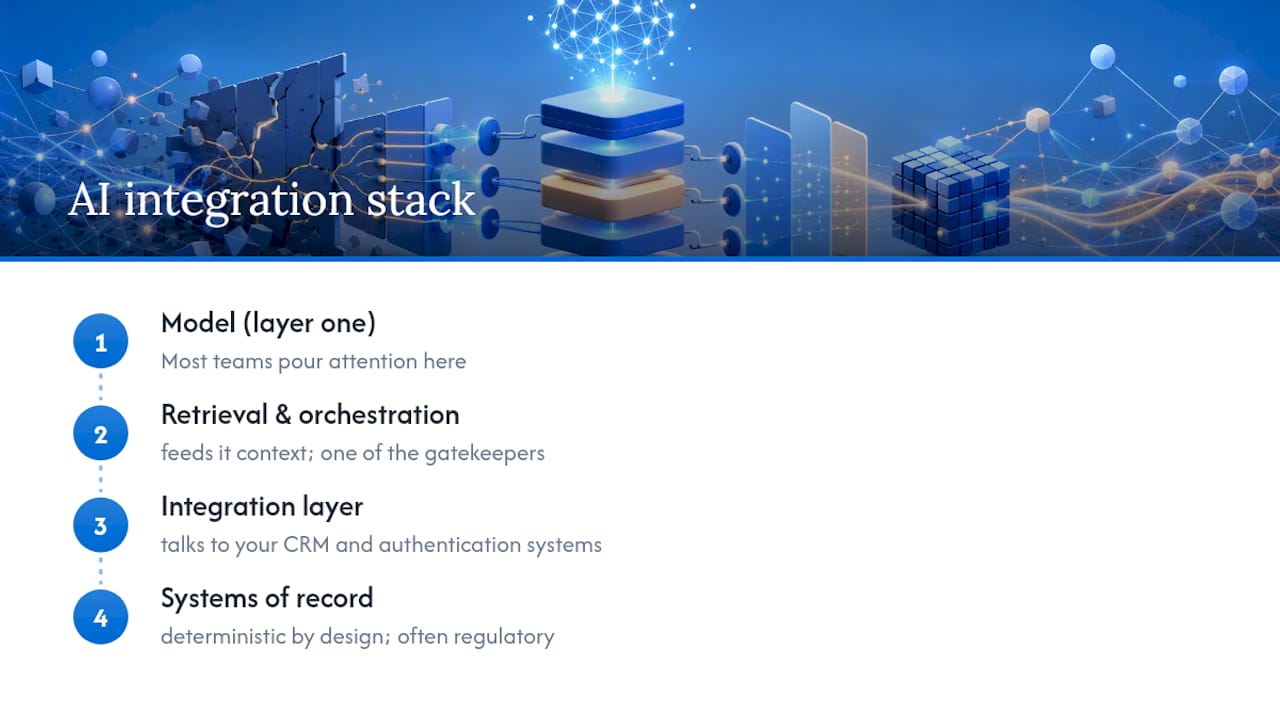
Picture the stack as four layers: the model itself, the retrieval and orchestration logic that feeds it context, the integration layer that talks to your CRM and authentication systems, and finally your systems of record. Most teams pour their attention into layer one and treat layers two through four as plumbing to sort out later. That’s backwards. The State of Integration & AI research found integration challenges are a top barrier cited by organisations that have already deployed AI, and while many respondents rate centralised governance as critical, only a small share have actually built it. That gap between “we know it matters” and “we’ve done it” is where most projects stall.
Pro Tip: Design your system’s failure behaviour before you design its success behaviour. Decide now what happens when the model is uncertain, when an API call times out, or when a human needs to intervene. If you can’t answer that today, you’re not ready to schedule a go-live date.
What are the most common AI system integration failures?
Here’s the ranked reality, drawn from documented failure patterns across enterprise deployments, with the red flag, the consequence, and the fix for each.
-
Unclear or unmeasurable business objectives. The red flag is a project brief that says “improve customer experience with AI” without a number attached. The consequence: nobody can tell if it’s working, so it drifts, gets deprioritised, or gets killed in a budget review. Fix it by defining one measurable outcome before writing any integration code, such as “reduce average handling time by 20%” or “cut manual invoice keying by 500 hours a month.”
-
Poor data quality, availability and governance. Symptoms include no data lineage documentation and datasets that were never versioned, so nobody can explain why the model behaved differently last Tuesday. This breaks auditability and erodes trust fast once a regulator or a customer asks a hard question. The mitigation is dataset versioning and a lineage record from day one, treated as a compliance artefact, not an afterthought.
-
Underestimated integration complexity with legacy systems. The red flag is a timeline that allocates weeks to “connect to the CRM” for a system built two decades ago with undocumented custom fields. Practitioners call this the integration tax, and it routinely takes longer than building the model itself. Map every legacy dependency and API contract before committing to a go-live date, not after.
-
The pilot to production gap. A pilot running cleanly on sandbox data is a poor predictor of what happens against real, messy production data with real load and real edge cases. Systems design specialists point to this as the single most common structural cause of stalled deployments. The fix: run your evaluation set against genuine production data snapshots before you ever schedule a launch.
-
Missing monitoring and drift detection. No alerting, no dashboard, no defined threshold for when performance has degraded. The system silently gets worse until a customer complains. Build monitoring infrastructure and drift thresholds into the architecture, not as a post-launch nice-to-have.
-
Ignoring human-in-the-loop requirements and change management. Teams roll out full automation without keeping staff involved in scoping or review, which produces a “human override loop” where frontline staff quietly bypass the system because nobody trained them on it or trusted them with it. Common project mistakes research flags change management neglect as a recurring, avoidable cause of failure.
-
Weak security, compliance and governance controls. No documented, auditable decision path means the project gets shelved for compliance reasons even when the technology works fine. Analysts describe this “governance vacuum” as a common cause of cancellation that has nothing to do with model performance.
-
Unrealistic scope and feature creep. Trying to automate everything at once instead of one workflow well. Scope balloons, timelines slip, and stakeholders lose confidence before anything ships.
-
No named operational owner. Without an explicit, on-call person responsible for monitoring drift and managing prompt or version changes, systems degrade quietly and nobody notices until the damage is visible in customer complaints or financial reconciliation.
-
Vendor lock-in and proprietary dependency. Heavy reliance on one vendor’s proprietary orchestration layer leaves teams unable to adapt when requirements shift, and Gartner predicts that a significant share of agentic AI projects will be cancelled before 2028, often tied to exactly this kind of brittle dependency.
Three brief examples make this concrete. An accounts payable team deployed an invoice extraction model that performed well in testing but had no input validation in production; documented case analysis shows that adding validation, alerting, and a human review gate cut the automated error rate from several percent down to a much lower rate. A customer service rollout skipped change management entirely, and staff quietly stopped using the tool within weeks because it contradicted workflows nobody had consulted them on. A financial services firm hit a governance vacuum: the model worked technically, but with no documented decision trail, the compliance team blocked the launch outright.
Watch for these red flags in your own project right now:
- No single person can name the current data lineage for the training or retrieval set.
- The go-live date was set before legacy API contracts were mapped.
- Nobody can show you a drift dashboard or a defined alert threshold.
- Frontline staff were never asked how the tool fits their actual workflow.
- The vendor contract has no clear exit or data portability clause.
How do you build a playbook to prevent AI integration failures?
Prevention follows a sequence, and skipping steps is exactly how projects end up back at step one six months later.
Step 1: Define the measurable outcome first. Before any architecture discussion, agree on the number that defines success and who owns it. This belongs to the business sponsor, not IT, and it should be locked before a vendor is chosen.
Step 2: Design the integration architecture deliberately. Map every system of record the AI needs to touch, every authentication boundary, and every place a probabilistic output meets a deterministic system. This is IT architecture’s job, and it typically takes longer than most teams budget, so add contingency time here specifically. Resources on enterprise integration architectures are worth reviewing at this stage.
Step 3: Build retrieval, validation and guardrails as first-class components. This isn’t optional plumbing. It’s the layer that decides whether the model’s output is trustworthy enough to act on without a human checking every single item.
Step 4: Build the human-in-the-loop workflow and the operational runbook alongside the model, not after it. Decide now who reviews exceptions, what triggers an escalation, and what the fallback process looks like when the system is uncertain.
Step 5: Stand up monitoring, alerting and evaluation infrastructure before launch. If you can’t see drift happening, you can’t respond to it. This should exist and be tested before the first production transaction runs through the system.
Step 6: Roll out in stages with a rollback plan. Start with one workflow, one team, one region. Prove it. Expand deliberately.
Choosing between rollout patterns depends on your risk appetite and how mature your integration architecture already is.
| Approach | Best when | Trade-off |
|---|---|---|
| Phased rollout (one workflow at a time) | Legacy systems are complex or poorly documented | Slower to show enterprise-wide value, but far lower risk of a public failure |
| Big-bang deployment | Workflow is simple, well-bounded, low regulatory risk | Fast visible impact, but a single integration gap can take down the whole rollout |
| In-house integration build | You have dedicated platform engineering capacity | Full control and auditability, but slower and resource-intensive |
| Managed/private-cloud integration platform | You need speed with enterprise-grade compliance built in | Faster time to production with data sovereignty intact, provided vendor lock-in risk is managed contractually |
Pro Tip: Name a single day-to-day operator for the system before launch, not after. This person owns drift monitoring, prompt and version changes, and the escalation runbook. Projects without this named owner degrade fastest, because nobody is actually watching the dashboard once the launch excitement fades.
What checklist and KPIs should you monitor before going live?
Run through this before you sign off on any go-live date:
- Objectives: Is there one measurable business outcome, agreed and signed off by the business sponsor?
- Data readiness: Is the data versioned, with lineage documented and available for audit?
- Integration interfaces: Have all legacy API contracts and authentication boundaries been mapped and tested against real production data?
- Security and compliance sign-off: Has the deployment been reviewed against a recognised control framework such as ISO 27001, with sign-off from your compliance lead?
- Monitoring and runbooks: Does a drift dashboard exist, and is there a documented escalation runbook for exceptions?
- User training: Have frontline staff been trained and consulted, not just informed?
- Rollback criteria: Is there a defined threshold at which the rollout pauses or reverts?
The KPIs below give you concrete thresholds to watch once the system is live, rather than vague intentions to “monitor performance.”
| Metric | What it measures | Suggested watch threshold |
|---|---|---|
| Extraction/output error rate | Accuracy of the model’s core task output | Investigate above 1 to 2%; case data shows well-controlled systems can run under 1% |
| Human override rate | How often staff reject or correct AI output | Rising trend over two consecutive weeks signals drift or trust breakdown |
| API/integration error rate | Failures in the connective layer, not the model | Any sustained rate above near-zero warrants investigation |
| Latency | Real-world response time under load | Set against your workflow’s tolerance, not the model vendor’s lab benchmark |
| Drift metric (output distribution shift) | Whether production behaviour is diverging from validated baseline | Define a specific statistical threshold at design time, before launch |
Abort or rework the rollout, and escalate to the project sponsor and compliance lead, if you see any of these: the human override rate is climbing week over week with no clear cause, the integration layer has no defined owner, or compliance sign-off is being treated as a formality rather than a genuine gate.
What does the research say about fixing the integration layer?
The consensus across recent field research is consistent: the integration layer, not the model, is the dominant failure vector. The twelve failure modes analysis found three specific modes drive most of the damage, and separate structural pattern research identifies four recurring failure patterns, the data handoff gap, the governance vacuum, the dependency chain break, and the human override loop, each requiring a distinct operational control rather than a generic fix.
Concrete patterns worth building in from the start: a retrieval subsystem treated as its own engineered component rather than an afterthought bolted to the model; validation gates that check outputs before they touch a system of record; entitlement-aware indexing so the AI only ever surfaces data a given user is actually authorised to see; and version control over prompts and model configurations with an evaluation regression pipeline that catches quality drops before customers do. Documented case work shows these are ordinary engineering disciplines, not exotic AI-specific inventions, and that’s precisely why skipping them is so costly.
Standards frameworks give this structure legal and operational teeth. Mapping your deployment against ISO 27001 controls, particularly around access management, audit logging, and incident response, turns “we think this is secure” into something a compliance team can actually sign off against.
The integration layer is where enterprise AI projects actually fail. Pilots test the model. Production tests everything else: retrieval, validation, entitlement, and observability built as deliberate engineering, not afterthoughts bolted on once something breaks.
Pro Tip: Build a one-page compliance checklist mapped directly to ISO 27001 control categories before you approach your security team for sign-off. Teams that show up with this mapping already done get approvals in days rather than weeks, because the legal and security review has nothing left to chase down.
Key takeaways and recommended next steps
Most AI integration failures trace back to the integration layer and governance gaps, not the underlying model, and fixing that layer first is what gets projects to production.
Assign these three actions this week: have your architecture lead map every legacy system dependency and authentication boundary within five business days; have your compliance lead confirm an ISO 27001 mapping and sign-off timeline within the same sprint; and name a single operational owner for drift monitoring and version control before any further development work proceeds.
| Point | Details |
|---|---|
| Integration layer is the real risk | Retrieval, validation and entitlement engineering fail more often than the model itself. |
| Pilots don’t predict production | Test against real, messy production data before scheduling any go-live date. |
| Named ownership prevents silent decay | Assign one operator responsible for drift monitoring and version control before launch. |
| Governance gaps stall projects | Document decision paths and map controls like ISO 27001 early to avoid compliance-driven cancellation. |
| Stage the rollout | One workflow, proven, then expand, with a defined rollback threshold at every stage. |
Author perspective: how we approach integration projects
The pattern I keep seeing, across every case study, analyst report and field vignette in this research, is that teams treat the model as the risky part of the project and the integration as the boring part. That’s the exact inversion of where the real risk sits. Conversational AI’s approach to deployment starts from the integration layer outward: we map the CRM, the authentication boundaries and the compliance requirements before we tune a single prompt, because that’s where projects actually die. Data sovereignty matters here too. Hosting entirely within Australia isn’t a marketing line, it’s an operational answer to the governance vacuum that shelves so many otherwise-working systems, because it gives compliance teams a clean, auditable answer before they even ask the question.
Named operational ownership is the other piece people underrate. A system without a person accountable for its drift, its prompt versions and its escalation path will degrade, quietly, regardless of how good the initial deployment was. If your team is weighing up a rollout and wants a second set of eyes on where your integration architecture might be thinner than it looks, a production-readiness review is a practical next step, and Conversational AI runs implementation workshops for exactly this kind of check before committing to a go-live date.
Sources
- The twelve failure modes of AI integration (and the three that cause 80% of the damage). · J Labs insights · J Labs
- Twohundred
- The Integration Layer Is Where Enterprise AI Projects Actually Fail
- Why AI Projects Fail After the Pilot: Integration Layer Problems - Diosh Lequiron
- Gartner says artificial intelligence projects in infrastructure and operations stall ahead of meaningful ROI returns
Recommended
- Types of enterprise AI integration architectures: 2026 guide - Conversational AI
- AI system integration for Australian enterprises - Conversational AI
- How AI integrates with legacy systems: Australian enterprise guide - Conversational AI
- Contact centre AI integration: a 2026 enterprise guide - Conversational AI