How email AI automation works: 2026 guide
Discover how email AI automation works in 2026. Learn how this technology enhances communication and boosts efficiency in your organization.

Email AI automation is the use of intelligent software that reads, understands, and acts on your emails automatically to manage communication at scale. Unlike traditional rule-based filters, modern AI email systems use large language models, machine learning classifiers, and natural language understanding to interpret message intent, tone, and context. The result is an AI email workflow that triages, drafts, routes, and follows up on emails without constant human input. For business leaders in medium to large organisations, understanding how email AI automation works is the first step toward deploying it with confidence.
How AI reads and understands emails beyond traditional rules
Traditional email filters match keywords to predefined rules. AI systems do something fundamentally different: they read entire messages, including body text, tone, urgency signals, and sender relationship history, to determine intent. This shift from keyword logic to holistic message analysis is the core reason AI outperforms rule-based systems in accuracy and adaptability.
Large language models, built on transformer architecture, power this understanding. Transformers process every word in relation to every other word in a message, which means the model grasps nuance. A message saying “we need this sorted before end of quarter” and one saying “please action this urgently” map to the same intent, even though they share no keywords. The model weights urgency, sentiment, and context simultaneously.

The system also learns from your team’s behaviour over time. When a manager consistently marks certain supplier emails as high priority, the AI adjusts its classification model accordingly. This continuous learning loop means accuracy improves with use, not just with configuration.
Pro Tip: Feed your AI system a sample of 30 to 60 past emails that your team manually triaged. This gives the classifier a strong baseline before it processes live traffic, reducing early errors significantly.
What are the core AI automation workflows in email management?
Once the AI understands an email’s intent, it executes a workflow. These workflows cover the full lifecycle of an email from arrival to resolution.
Inbox triage and organisation is the first layer. The AI automatically:
- Prioritises messages by urgency and sender relationship
- Labels emails by category (billing, support, sales, internal)
- Archives low-priority threads without human input
- Flags messages requiring a response within a defined timeframe
Automated drafting is the second layer. Large language models generate reply drafts tailored to your organisation’s tone. Grounding the AI with five to six writing samples from a specific team member allows it to mirror that person’s vocabulary, sentence structure, and formality level. This matters in enterprise contexts where brand voice and professional consistency are non-negotiable.
Workflow triggers form the third layer. The AI fires actions based on email content. A client email mentioning a contract renewal triggers a CRM update, a calendar invite to the account manager, and a follow-up reminder at 72 hours. These multi-step sequences run without developer input. Complex nine-step nurture workflows can be built in under two hours using modern visual workflow tools, which is a meaningful productivity gain for operations teams.
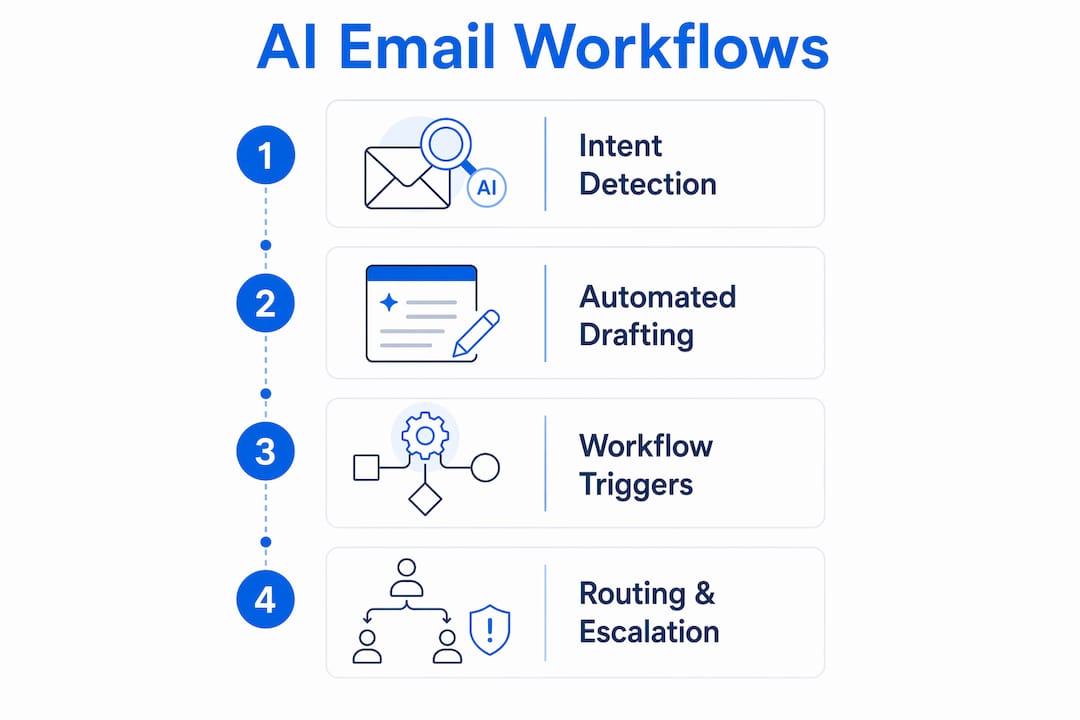
Routing and escalation complete the picture. The AI directs emails to the right team or individual based on content, and escalates to a human agent when it detects a complaint, legal language, or a sentiment score below a set threshold. For a deeper look at how this applies across communication channels, AI communication orchestration principles apply directly to email routing logic.
How do you set up and secure an AI email automation platform?
Platform setup determines whether your AI email workflow is reliable and compliant from day one. Security is the first concern, and OAuth 2.0 with staged permission granting is the recommended standard. Avoid shared credentials entirely.
Follow this sequence when configuring access:
- Grant read-only access first. Allow the AI to observe and classify emails for two to four weeks before enabling any write or send permissions. This builds confidence in its accuracy before it acts autonomously.
- Add write permissions in stages. Enable drafting before enabling send. Review a sample of drafts daily during the first month.
- Configure SPF, DKIM, and DMARC records. These three deliverability standards authenticate your sending domain. Monitor deliverability records for 90 days before scaling outbound automation volumes, or automated emails risk landing in spam folders.
- Verify CRM and calendar integration compatibility. Connector gaps cause project failures when vendors lack native API support for platforms like Salesforce or Microsoft Dynamics. Confirm native integration before signing a contract.
- Define escalation rules and audit trails. Set clear thresholds for when the AI must hand off to a human, and log every automated action for compliance review.
For Australian organisations, data sovereignty adds another layer. Your email AI platform should process and store data within Australian borders to comply with the Privacy Act 1988 and sector-specific regulations in healthcare and finance.
Pro Tip: Run a parallel test for the first four weeks. Let the AI classify and draft while your team continues to handle emails manually. Compare outputs weekly. This reveals gaps in the model’s training before you remove human oversight.
How does AI improve email marketing results and business impact?
The business case for AI in email marketing is grounded in measurable outcomes. Predictive content in email campaigns lifts click-through rates by 22% compared to static campaigns. That lift compounds across a large contact database, making personalisation at scale one of the highest-return activities in enterprise marketing.
Email marketing already delivers strong returns. Every $1 spent on email marketing returns approximately $36, making it one of the most cost-efficient channels available. AI amplifies that return by improving segmentation accuracy, send-time optimisation, and content relevance for each recipient.
The table below summarises the primary impact areas:
| Impact area | What AI does | Business outcome |
|---|---|---|
| Personalisation | Predicts content preferences per recipient | Higher engagement and conversion rates |
| Send-time optimisation | Analyses open patterns to select ideal send times | Improved open rates across segments |
| Triage and routing | Classifies and directs inbound emails automatically | Faster response times, lower handling costs |
| Follow-up automation | Triggers reminders based on email content and CRM data | Fewer missed opportunities in sales pipelines |
| Compliance and audit | Logs all automated actions with timestamps | Reduced risk in regulated industries |
Human oversight remains non-negotiable for high-stakes communications. Human-in-the-loop approval workflows are the advised standard for customer-facing replies, particularly in finance, legal, and healthcare contexts. The AI drafts; a human approves before sending. This model captures efficiency gains while maintaining accountability.
The most common pitfall is scaling too fast. Organisations that automate outbound volume before establishing deliverability records see sharp drops in inbox placement. Build the foundation first, then scale. For practical examples of how AI lifts team output across departments, enterprise productivity case studies show the pattern clearly.
Key takeaways
AI email automation delivers the greatest value when intent-based understanding, phased setup, and human oversight work together from the start.
| Point | Details |
|---|---|
| AI reads intent, not just keywords | Large language models analyse full message context, improving classification accuracy over rule-based filters. |
| Stage your platform setup | Grant read-only access before write permissions, and verify SPF, DKIM, and DMARC before scaling volume. |
| Automate workflows in layers | Start with triage and drafting, then add routing and follow-up triggers as confidence in the model grows. |
| Keep humans in the loop | Use approval workflows for customer-facing replies, especially in regulated industries like finance and healthcare. |
| Measure impact before scaling | Track click-through rates, response times, and deliverability scores for at least 90 days before expanding automation. |
My honest assessment of AI email automation in enterprise
I have watched a lot of organisations approach AI email automation the same way they approached their first CRM rollout: with high expectations and a short timeline. The technology is genuinely capable. The gap is almost always in implementation discipline, not the AI itself.
The shift from rule-based filtering to intent-based AI is not just a technical upgrade. It changes how your team thinks about email as a process. Rules are static; AI is adaptive. That adaptability is the value, but it also means the system needs time and quality training data to reach its potential. Organisations that rush past the read-only phase and skip the parallel testing period consistently report lower satisfaction with their AI email tools, not because the tools are poor, but because the foundation was not set correctly.
Phased rollout is not caution for its own sake. It is how you build the internal confidence that sustains adoption. When your team sees the AI correctly classify 95% of emails in week three of the read-only phase, they trust it enough to let it draft in week five. That trust is what makes the efficiency gains stick.
The future of AI email automation in enterprise is moving toward fully contextual agents that maintain memory across conversations, integrate with voice and SMS channels, and adapt to individual communication styles without manual retraining. Australian businesses that build the right foundation now will be positioned to adopt those capabilities without starting over.
— Sowrabh
Conversational AI’s email agents for Australian businesses
Australian businesses face a specific challenge: enterprise-grade AI email automation must meet local data privacy requirements, not just global standards. Conversational AI addresses this directly with AI agents built for Australian organisations, hosted entirely within Australia, and designed to integrate with your existing CRM and communication infrastructure.
The platform supports multi-channel AI agents across email, voice, SMS, and live chat, with contextual memory and automated follow-up built in. Whether you are running a pilot in one department or deploying across a national operation, Conversational AI offers a structured onboarding process that mirrors the phased setup approach described in this article. For teams ready to move from manual email handling to AI-managed workflows, the path starts with a low-risk pilot. Visit Conversational AI to see how the platform fits your organisation’s needs.
FAQ
What is email AI automation?
Email AI automation is the use of machine learning and large language models to automatically read, classify, draft, and respond to emails based on message intent and context. It replaces manual email handling with intelligent, rule-free workflows that improve over time.
How does AI understand email intent without keyword rules?
AI models built on transformer architecture analyse the full content of a message, including tone, urgency, and sender history, to determine intent. This means two differently worded emails with the same meaning receive the same classification and response.
What security standards apply to AI email platform setup?
OAuth 2.0 with staged permissions is the recommended standard, starting with read-only access before enabling write or send rights. SPF, DKIM, and DMARC records must also be configured and monitored before scaling outbound automation.
How much does AI improve email marketing performance?
Predictive content in AI-driven campaigns increases click-through rates by 22% compared to static campaigns. Combined with the baseline return of approximately $36 per $1 spent on email marketing, AI personalisation produces a compounding performance advantage.
Should humans still review AI-generated emails?
Human-in-the-loop approval is advised for all customer-facing replies, particularly in regulated industries. The AI drafts the response; a human reviews and approves before it sends. This approach captures efficiency gains while maintaining accountability and compliance.