The Role of Chatbots in Customer Support: 2026 Guide
Discover the role of chatbots in customer support. Learn how AI tools enhance efficiency, improve satisfaction, and transform interactions in 2026.

Chatbots in customer support are AI-powered tools designed to automate routine customer interactions, resolve common issues, and free human agents for complex problems. The role of chatbots in customer support has expanded well beyond simple FAQ responses. Today, AI-driven chatbots handle intent recognition, multi-turn conversations, and backend task execution across CRM, ticketing, and billing systems. AI chatbots reduce average first response times by 37%, and 92% of businesses report improved customer satisfaction after implementation. That combination of speed and satisfaction makes chatbots one of the most measurable investments in enterprise support operations.
What chatbot features most improve customer satisfaction and trust?
Information quality, problem-solving capability, and understanding of humanness are the three chatbot attributes that most significantly enhance customer satisfaction. A 2026 survey of 282 respondents confirmed this using PLS-SEM analysis. Notably, anthropomorphic cues alone do not drive satisfaction. A chatbot that sounds human but gives wrong answers will lose customers faster than one that sounds mechanical but solves the problem.
Trust in chatbots operates on two levels. Cognitive trust depends on accuracy, technical competence, transparency, responsiveness, and data protection. Affective trust relates to human-like conversational cues. Affective trust does not compensate for low accuracy. A 2026 qualitative study with 28 participants found that customers disengage quickly when a chatbot sounds warm but fails to deliver correct information. The practical implication: design for competence first, personality second.

For enterprise support managers, this research reframes the design conversation. The instinct to make chatbots feel more human is understandable. Customers do respond better to conversational language. But transparency about chatbot capabilities and reliable escalation triggers matter far more to long-term trust than tone of voice.
Key attributes that drive chatbot trust and satisfaction:
- Accuracy and reliability: Correct answers on the first attempt build cognitive trust faster than any design element.
- Transparency: Customers accept chatbot limitations when those limits are stated clearly upfront.
- Data protection: Customers need to know their data is handled securely, especially in finance and healthcare.
- Escalation clarity: A chatbot that knows when to hand off to a human agent preserves trust when it cannot resolve an issue.
- Response speed: Prompt replies signal competence, even before the content of the answer is evaluated.
Pro Tip: Set explicit capability boundaries in your chatbot’s opening message. Telling customers what the bot can and cannot do reduces frustration and sets realistic expectations before any issue arises.
How can chatbots both help and hinder customer support operations?
Chatbots provide immediate, consistent answers 24/7, lower customer effort, and help businesses build more consistent service experiences. For enterprise teams managing thousands of interactions daily, that consistency is a genuine operational advantage. Chatbots handle repetitive queries at scale without fatigue, reducing cost per contact and freeing senior agents for high-value work.
The benefits of chatbots in customer service are well documented. They include:
- Reduced response times: Customers get answers in seconds rather than minutes or hours.
- Cost reduction: Automated handling of Tier 1 queries lowers staffing costs for routine interactions.
- 24/7 availability: Chatbots operate outside business hours without additional labor cost.
- Consistent messaging: Every customer receives the same accurate answer, reducing variance caused by agent knowledge gaps.
- Scalability: Volume spikes during product launches or outages do not overwhelm automated support channels.
The risks are just as real, and they are often underestimated. Customers may perceive chatbots as deflecting issues rather than resolving them when resolution criteria are misaligned with actual customer outcomes. A 2026 CNBC report featuring a Zendesk CEO interview highlighted this problem directly. Zendesk defines resolution as the point when the customer, the business, and the employee all agree the issue is solved. Many chatbot deployments count a closed ticket as a resolution, even when the customer’s problem remains unresolved.
“Resolution should be defined by the customer’s outcome, not the system’s status update.” — Zendesk, 2026
That gap between system-defined resolution and customer-felt resolution is where chatbot frustration originates. When customers feel routed through a maze with no exit to a human agent, satisfaction drops sharply. The technology is not the problem. The measurement framework is.
Pro Tip: Audit your escalation data monthly. If customers who interact with your chatbot are reopening tickets or calling back within 24 hours, your resolution definition needs adjustment before your chatbot design does.
What types of chatbots exist and which suit enterprise customer support?
Chatbot types include menu/button-based, rule-based, and AI-powered, each with distinct capabilities and appropriate use cases. IBM’s overview of chatbot types provides a clear framework for enterprise decision-making. Choosing the wrong type for a given use case is one of the most common and costly implementation mistakes.
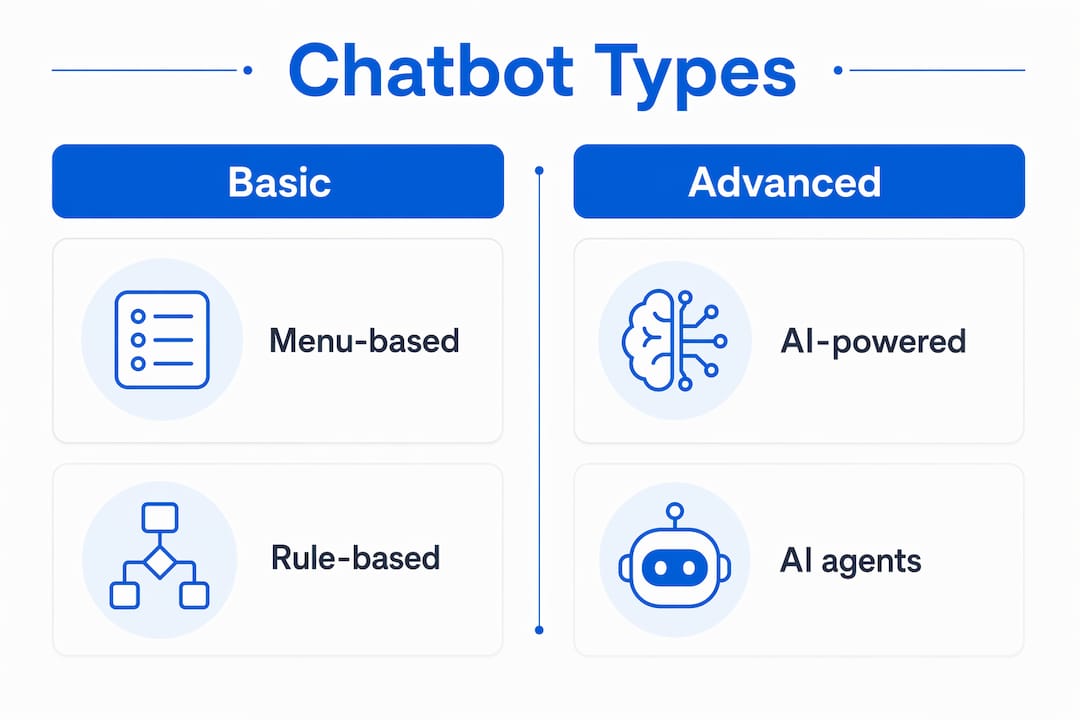
| Chatbot Type | Capability Level | Complexity | Best Enterprise Use Case |
|---|---|---|---|
| Menu/button-based | Low | Simple | FAQ navigation, store locators, basic self-service |
| Rule-based | Medium | Moderate | Structured workflows, order status, password resets |
| AI-powered | High | Advanced | Intent recognition, multi-turn support, task execution |
AI-powered chatbots are optimized for intent recognition, contextual multi-turn conversation, and executing tasks by integrating with backend systems. Chatbots integrated with CRM, ticketing, and billing systems can perform actions on behalf of customers, which increases containment rates by fully resolving issues rather than just answering questions. That distinction matters enormously at enterprise scale.
A further distinction separates AI chatbots from AI agents. Chatbots handle Tier 1 volume with defined use cases. AI agents tackle complex reasoning, exceptions, and multi-step problem solving that requires judgment. Understanding this operational boundary helps support managers allocate the right tool to the right problem. Deploying an AI agent for simple FAQ queries wastes resources. Deploying a rule-based chatbot for complex billing disputes creates the deflection problem described above.
For medium to large enterprises, AI-powered chatbots are the standard for automated customer support. They handle the volume, adapt to varied customer phrasing, and connect to the systems needed to take real action. You can learn more about how AI natural language processing applies to enterprise support scenarios.
Best practices for implementing chatbots to maximize customer service efficiency
Chatbot implementation in service environments succeeds when it starts with a targeted, well-defined use case rather than a broad deployment. The most common failure mode is launching a chatbot across all support channels before proving it works reliably on one. Start with the query type that has the highest volume and the most predictable resolution path.
A structured implementation approach for enterprise teams:
- Identify your highest-volume, lowest-complexity queries. Password resets, order status checks, and appointment bookings are ideal starting points. These have clear resolution criteria and low risk if the bot makes an error.
- Integrate with your CRM and ticketing system before launch. A chatbot that can only answer questions but cannot update records or create tickets adds limited value. Backend integration is what separates a useful tool from a glorified FAQ page.
- Define resolution criteria before you write a single conversation flow. Align your definition with the Zendesk standard: the customer, the business, and the agent all agree the issue is closed.
- Build escalation triggers into every conversation path. Customers should never reach a dead end. If the bot cannot resolve an issue within two or three turns, it should offer a human handoff automatically.
- Set metrics around true resolution, not deflection rate. Deflection rate measures how many customers the bot prevented from reaching a human. Resolution rate measures how many customers left with their problem solved. These are not the same number.
Pro Tip: Track “re-contact rate” as your primary chatbot health metric. If a customer contacts support again within 48 hours on the same issue, the first interaction was not a resolution. This single metric exposes deflection disguised as resolution.
Continuous improvement requires reviewing escalation transcripts weekly in the first 90 days. Patterns in failed conversations reveal gaps in your knowledge base, not just your chatbot logic. Fixing the underlying information quality problem improves both chatbot and human agent performance simultaneously. For enterprise teams managing AI automation across departments, this feedback loop is one of the highest-return activities available.
Key Takeaways
Chatbots improve customer support when they are built for accuracy and real resolution, not just speed and deflection reduction.
| Point | Details |
|---|---|
| Accuracy drives trust | Cognitive trust depends on correct answers and data protection, not conversational tone. |
| Resolution definition matters | Align resolution criteria with customer outcomes, not system status, to avoid deflection complaints. |
| Match chatbot type to use case | AI-powered chatbots suit complex enterprise queries; rule-based bots handle structured, predictable workflows. |
| Integrate before you launch | CRM and ticketing integration is what enables true task resolution, not just information delivery. |
| Measure re-contact rate | Re-contact within 48 hours on the same issue signals a failed resolution, regardless of chatbot metrics. |
Where chatbot theory meets operational reality
The research on chatbot satisfaction is clear, and I find it consistently underused in real deployment decisions. Most enterprise teams I have seen focus heavily on the conversational design, the persona, the tone. They spend weeks debating whether the bot should have a name. Meanwhile, the knowledge base feeding the bot is outdated, the escalation path is buried three menus deep, and nobody has defined what “resolved” actually means.
The uncomfortable truth is that a chatbot with a flat, functional personality and a well-maintained knowledge base will outperform a charming bot with bad data every single time. Customers are not looking for a friend. They are looking for a fast, correct answer and a clear path to a human if that answer is not available.
The other thing I see consistently is organizations treating chatbot deployment as a one-time project rather than an ongoing operation. The bot goes live, the team moves on, and six months later the escalation rate is climbing and nobody knows why. Chatbots require the same ongoing attention as any other support channel. Transcripts need review. Resolution definitions need auditing. Knowledge bases need updating.
The organizations that get the most from automated customer support are the ones that treat their chatbot as a live product with a product owner, not a set-and-forget tool. That mindset shift is more important than any feature on the vendor’s capability list.
— Sowrabh
How Conversational AI supports enterprise chatbot deployment
Enterprise support teams need more than a chatbot builder. They need a platform that connects voice, SMS, email, and live chat into a single, auditable system with real backend integration.
Conversational AI delivers enterprise-grade AI agents built specifically for Australian businesses, with full data sovereignty and private cloud hosting. The platform integrates with existing CRM and ticketing systems, supports natural language understanding across multiple channels, and provides real-time analytics to track true resolution rates. For support managers who need to move beyond deflection metrics and build a system customers actually trust, Conversational AI offers the infrastructure to do it right.
FAQ
What is the role of chatbots in customer support?
Chatbots in customer support automate routine interactions, provide 24/7 responses, and integrate with CRM and ticketing systems to resolve issues without human intervention. Their primary value is handling high-volume, low-complexity queries at speed and consistent quality.
Do chatbots actually improve customer satisfaction?
92% of businesses report improved customer satisfaction after implementing AI chatbots, provided the bots deliver accurate information and clear escalation paths. Satisfaction drops when chatbots deflect rather than resolve.
What is the difference between a chatbot and an AI agent?
Chatbots handle Tier 1 queries with defined use cases and predictable resolution paths. AI agents manage complex, multi-step reasoning and exceptions that require judgment beyond scripted responses.
How do you measure chatbot success in customer service?
True chatbot success is measured by resolution rate and re-contact rate, not deflection rate. A resolved interaction means the customer did not need to follow up on the same issue within 48 hours.
Why do customers sometimes hate chatbots?
Customers perceive chatbots negatively when the bot’s resolution definition does not match their actual outcome. When escalation paths are unclear or unavailable, customers feel trapped rather than helped.