Choosing the right SAP chatbot integration pattern
Discover how to choose the best SAP chatbot integration pattern for your needs, optimizing API and webhook usage for efficient transactions.

Use Consume API for simple, read-only lookups against SAP data, and use Call Webhook with BTP middleware and SAML principal propagation for authenticated, stateful transactions. A working setup needs an SAP BTP subaccount with Cloud Foundry enabled, SAP Identity Authentication Service (IAS), a Cloud Connector for on-premise reach, and exposed OData endpoints. Every webhook response must follow the SAP Conversational AI UI JSON protocol exactly, and any authenticated call needs verified principal propagation before it goes near production.
TL;DR:
- Use Consume API for quick, stateless data retrieval, especially when response time is critical, and avoid it for actions requiring user identification or data modification.
- Implement webhooks with principal propagation for complex, transactional, or user-specific SAP operations where backend orchestration and security are essential.
- Prepare a robust SAP environment with Cloud Foundry, IAS, destinations, trust certificates, and Cloud Connector before developing bot skills to ensure smooth integration.
- Manage OAuth tokens carefully with automated refresh logic, distinct environment destinations, and strong security practices to prevent silent failures and data breaches.
- Prioritize thorough testing at webhook, conversational, and end-to-end levels, and stage environments properly to prevent issues before deploying to production.
Table of Contents
- Sap chatbot integration: consume API vs webhook, and how to pick
- What SAP components do you need before connecting a bot?
- How does principal propagation work with IAS and SAML?
- Building webhooks: middleware patterns and the JSON protocol
- Which channels and Fiori integration options work best?
- How do you test and debug a live SAP chatbot integration?
- When does a private, Australia-hosted platform make sense for SAP integrations?
- Step-by-step configuration of intents and entities for SAP workflows
- Setting up and managing OAuth flows for secure API access
- Error handling best practices in chatbot-SAP communication
- Performance optimisation for scalable chatbot integrations
- Security and compliance considerations beyond authentication
- A few lessons from getting these integrations right
- Where Conversational AI fits into your SAP integration roadmap
- Sources
Sap chatbot integration: consume API vs webhook, and how to pick
The decision comes down to one question: does this interaction need to know who the user is and change data on their behalf, or does it just need to fetch something and hand it back?
Consume API Services is the lighter option. You configure it directly inside a skill’s action, point it at an endpoint, and SAP Conversational AI fires the HTTP request itself. The response JSON lands in a variable called api_service_response, which you then reference in your bot’s messages or pass into conditions. There is no middleware layer, no server you have to run, and no deployment pipeline. It is the mechanism SAP documents for straightforward data retrieval, and it works well when the call is stateless and doesn’t need heavy transformation.
Call Webhook works differently. Instead of the bot calling an endpoint and reading one response back, it posts the entire conversation context as JSON to a URL you control. That means your webhook receives the full memory object, the current message, detected intents and entities, and any custom conversation variables, all in one payload. Your middleware processes that payload, does whatever business logic or backend orchestration is needed, and returns a structured response back to the chat UI. SAP’s developer tutorial builds this exact pattern, pairing a sample Python webhook with a live BTP deployment, precisely because most non-trivial integrations end up needing that middle layer.
Here’s the quick way to decide which one you need:
- Latency tolerance: if the user is waiting on a quick answer (stock status, order lookup), Consume API’s direct call is usually faster than round-tripping through middleware.
- Authentication complexity: if the call needs SAML bearer tokens, principal propagation, or OAuth token refresh logic, you need webhook middleware to manage that securely, since Consume API has limited auth handling built in.
- Transaction type: read-only enquiries suit Consume API; anything that creates, updates, or deletes SAP records should go through a webhook where you can validate, log, and roll back safely.
- UI control: if you want to return SAP Conversational AI’s richer UI elements (cards, quick replies, buttons) dynamically based on backend logic, webhooks give you full control over that JSON structure.
A numbered way to think through a new use case before you build it:
- Define the transaction type. Is this a lookup or a change? If it changes anything in S/4HANA, default to webhook.
- Check the auth requirement. Does the caller need to be identified as a specific ABAP user for authorisation checks? If yes, webhook plus principal propagation is mandatory.
- Estimate response complexity. If you’re formatting multiple SAP tables into a conversational summary, do that transformation in middleware rather than cramming logic into the bot’s skill conditions.
- Decide on error handling depth. Webhooks let you catch backend failures, retry, and return a graceful fallback message. Consume API’s error handling is more limited.
- Confirm environment separation. Whichever pattern you choose, make sure it points to the correct destination for dev, test, or production before you ship it.
In practice, most enterprise deployments end up using both patterns side by side. A product catalogue lookup, a warehouse stock check, or a document status enquiry are classic Consume API candidates: they’re read-only, low-risk, and don’t need identity propagation. Creating a purchase requisition, updating a customer’s shipping address, or approving a workflow step in S/4HANA are webhook territory. Those actions need to be traceable to a specific user, wrapped in proper transaction handling, and often need multi-step confirmation logic that’s easier to manage in a Python or Node service than inside the bot builder itself.
There’s a middle case worth flagging: enquiries that are technically read-only but pull from multiple backend systems (SAP plus a CRM, say, or SAP plus a ticketing tool). Even though nothing gets written back, the orchestration complexity usually justifies middleware anyway, because you don’t want three separate Consume API calls chained together inside a single skill with no shared error handling.
Pro Tip: Keep separate destination names for dev, test, and production from day one, even if they point to the same backend early on. Renaming a destination after go live means re-pointing every skill that references it, and that is a painful afternoon you can avoid entirely by naming things S4_DEV, S4_TEST, and S4_PROD from the start.
What SAP components do you need before connecting a bot?
Before you write a single skill, get the platform layer right. Skipping this step is the single most common reason integrations stall halfway through a pilot.
Here’s the minimum landscape a standard enterprise integration needs, in the order you’ll typically provision it:
- An SAP BTP subaccount with Cloud Foundry enabled. This is where your middleware application, if you need one, actually runs. Without Cloud Foundry entitlements enabled on the subaccount, you can’t deploy a webhook app or bind it to any backend services.
- A SAP Conversational AI subscription tied to that subaccount. The bot itself lives in the Conversational AI environment, but its connections to backend services route through BTP-managed destinations, so the subscription and subaccount need to be aligned from the outset.
- SAP Identity Authentication Service (IAS) configured as the trusted identity provider. A standard enterprise setup requires SAML authentication via IAS so that user identity can flow from the chat interface through to backend authorisation checks, rather than every call running as a generic service user.
- Destinations configured in the BTP cockpit. A destination isn’t just a base URL, it’s a named configuration object that bundles the URL, authentication method, and any additional properties (like principal propagation flags) your app or bot needs to reach a specific backend. Get in the habit of using system aliases here, so a skill references
S4_SALES_DESTrather than a hardcoded hostname. - Trust certificates exchanged between BTP and the backend system. For SAML based flows and principal propagation, the backend needs to trust certificates issued by IAS, and BTP needs the backend’s certificate registered as a trusted provider. This exchange is a manual, one-time step per environment, and it’s the step teams most often forget to repeat when promoting from test to production.
- SAP Cloud Connector, if any backend is on-premise. SAP recommends configuring Cloud Connector for on-premise connectivity, mapping virtual hosts to internal system hostnames so BTP never needs a direct network route into your data centre.
Once those six pieces exist, the base URL question becomes straightforward: your bot’s skills and any webhook middleware should never call a raw hostname directly. Every outbound call should resolve through a destination, addressed by its system alias. That indirection is what lets you promote a bot from test to production by changing one destination’s target URL rather than hunting through every skill for a hardcoded endpoint.
Dev, test, and production separation deserves its own checklist, because credential leakage between environments is a genuinely common failure mode:
- Use separate BTP subaccounts per environment rather than folder-level separation within one subaccount, since subaccounts give you cleaner entitlement and trust boundaries.
- Rotate service keys and OAuth client secrets independently per environment, and store them in a secrets vault rather than in application code or a shared spreadsheet.
- Keep trust certificate expiry dates on a calendar reminder well ahead of expiry. A lapsed SAML certificate doesn’t fail loudly, it fails silently with authentication errors that look like backend outages.
- Never point a test bot’s destination at a production S/4HANA system “just to check something quickly.” It happens more often than teams admit, and it’s how test data ends up in production financial records.
Pro Tip: Name your BTP destinations by function, not by environment, and let the subaccount itself carry the environment context. A destination called SALES_ORDER_API that exists identically in dev, test, and prod subaccounts is far easier for a new team member to understand than three different destination names doing the same job.
How does principal propagation work with IAS and SAML?
This is the part of SAP chatbot integration that trips up the most teams, because it’s not really about connecting a bot at all. It’s about making sure the backend system knows exactly which real person is behind every request the bot makes on their behalf.

SAP Identity Authentication Service sits at the centre of this. IAS acts as the identity provider that BTP trusts, and it can also function as a proxy in front of your corporate identity provider if you’re not using IAS as the system of record directly. When a user authenticates into the chat channel, whether that’s a webchat widget or an embedded Fiori tile, their identity gets asserted through IAS via SAML. That assertion is what your middleware or the destination configuration uses to request a principal propagation token, rather than falling back to a generic technical user for every call.
Whether you need a full SAML bearer assertion flow or a simpler setup depends on how deep the authorisation checks go on the backend. If your bot only reads data that’s visible to any authenticated employee, a technical user with broad read access might be acceptable. The moment authorisation needs to differ by user, by role, or by organisational unit, you need principal propagation, full stop.
Mapping the SAML Subject Name ID to an actual ABAP user is where most configuration errors happen. Enterprise integrations rely heavily on this identity mapping, and there are a few approaches: matching against the ABAP user’s email address, matching against a custom user attribute synced from your corporate directory, or using a 1:1 mapping table maintained in the backend. Email matching is the fastest to set up but the most fragile long term, since email address changes (marriage, department transfers, contractor conversions) silently break the mapping without any obvious error at the point of failure.
Roughly a third of enterprise SAP integration failures reported in community forums trace back to identity mapping misconfiguration rather than network or API errors — a signal worth internalising before you assume a broken integration is a connectivity problem.
Here’s the checklist, in sequence, for getting this trust relationship working:
- Register the BTP subaccount as a trusted service provider inside IAS, and configure IAS as the trusted identity provider in the BTP subaccount’s trust settings.
- Export the IAS signing certificate and upload it to the backend system’s trust store, and export the backend’s certificate for registration in IAS if principal propagation is bidirectional.
- Create a communication arrangement using scenario SAP_COM_0676 (or the relevant principal propagation scenario for your S/4HANA release) in the backend system, which sets up the technical inbound communication user and OAuth/SAML configuration together.
- Configure the SAML bearer assertion provider in the communication arrangement so incoming assertions from IAS are accepted and mapped correctly.
- Test the flow end to end with a real test user before opening it to a pilot group, checking that the ABAP system logs show the correct mapped username rather than a generic service account.
- Re-verify the mapping any time a user’s identity attributes change in the corporate directory, since a silent mismatch here is far harder to debug than an outright authentication failure.
Get this piece right early. Retrofitting principal propagation after a bot has already gone live with a shared technical user is a much bigger project than building it correctly the first time.
Building webhooks: middleware patterns and the JSON protocol
Middleware is where the bot’s conversational logic meets your actual SAP backend, and its job is narrower than people expect. A webhook doesn’t need to understand SAP, ABAP, or OData deeply. It needs to accept a JSON payload from SAP Conversational AI, extract what it needs from that payload, call whatever backend service is appropriate, and return a response shaped exactly the way the chat UI expects.
The conversation JSON that arrives at your webhook typically includes the detected intent, extracted entities, the raw user message, conversation memory (any variables your skill has stored across turns), and metadata about the channel the message came from. Your middleware reads that payload, decides what backend action to take, and constructs a response.
- Validate the incoming payload structure before processing it. A malformed or unexpected payload should return a safe fallback message, not a stack trace.
- Keep backend calls to S/4HANA behind a dedicated service layer inside your middleware, rather than scattering OData calls throughout your webhook handler logic.
- Log the outbound request and inbound response for every backend call during development, and keep structured logs (not just print statements) once you’re in production.
- Handle timeouts explicitly. SAP backend calls that hang without a response will otherwise leave the chat UI waiting indefinitely.
A Flask-based Python webhook, in structural terms, generally has an endpoint that accepts POST requests, a request handler that parses the incoming conversation JSON, a service layer that maps the detected intent to a specific backend call, and a response builder that formats the reply into SAP Conversational AI’s expected structure before returning it. SAP’s own developer tutorial deploys exactly this kind of Python webhook to BTP Cloud Foundry, which is worth working through directly if you haven’t built a webhook against the platform before. Deployment itself is a standard cf push once your manifest.yml and buildpack are configured, and binding the destination service to your Cloud Foundry app is what lets the webhook reach backend systems without hardcoding credentials into your codebase.
If your backend is built on SAP’s Cloud Application Programming Model (CAP) rather than raw OData, the pattern is similar but the wiring point shifts. Your CAP service exposes its own OData or REST endpoints, and your webhook (or the bot’s Consume API call, if the CAP service is simple enough) calls those endpoints through a destination configured in BTP, exactly as it would for a native S/4HANA OData service. CORS needs explicit attention here: if your webchat is embedded in a browser context that differs from your webhook’s origin, you’ll need to configure allowed origins on both the CAP service and the webhook itself, or preflight requests will fail silently in ways that are frustrating to diagnose.
When the chat UI fails to render a response correctly, the cause is almost always the response JSON not matching the protocol exactly. SAP is explicit that the response format has to conform precisely to the UI protocol, and a missing field or wrong data type is enough to break rendering even when your backend logic worked perfectly.
Strict protocol formatting isn’t a suggestion, it’s the difference between a working reply and a blank chat bubble. Validate your webhook’s output JSON against SAP’s schema before you ever test it against the live bot, not after.
Pro Tip: Build a small local test harness that posts sample conversation payloads to your webhook and prints the raw response JSON. Catching a malformed field locally takes thirty seconds; catching the same issue by clicking through the chat preview takes ten minutes and tells you far less about what went wrong.
Which channels and Fiori integration options work best?
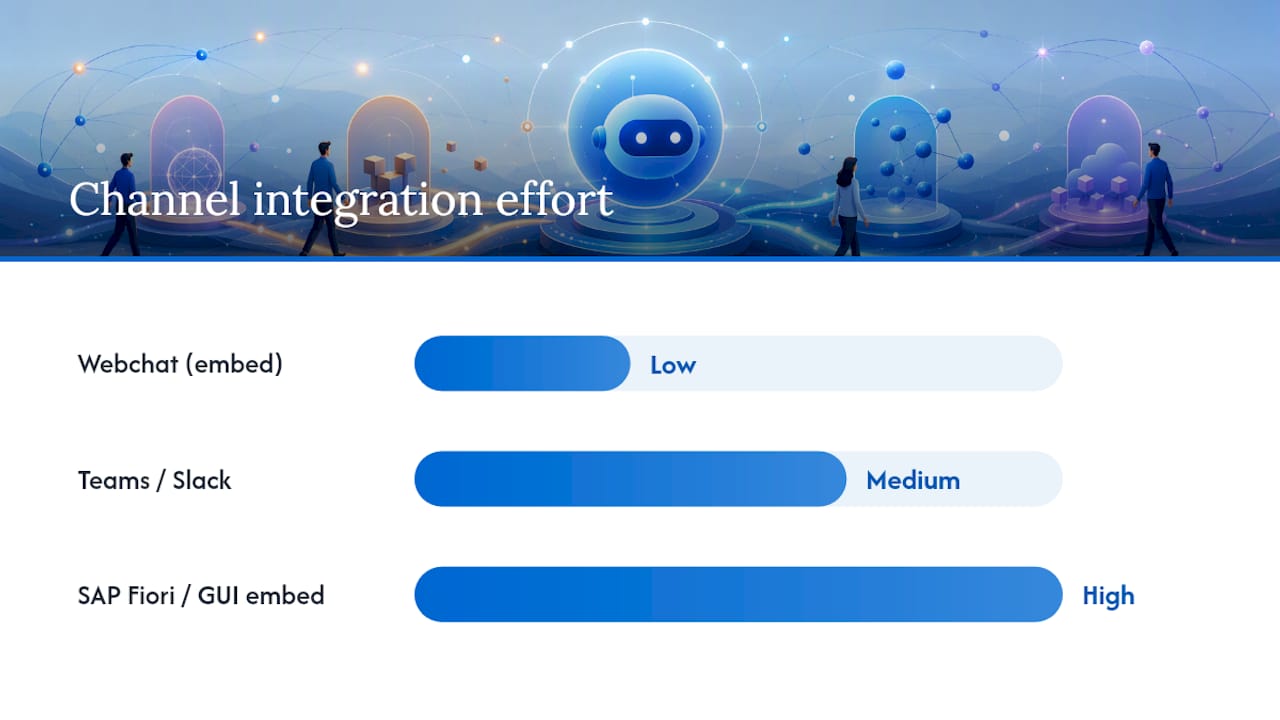
Getting a bot built and connected to SAP backends is only half the job. Users need somewhere to actually talk to it, and that channel choice affects both the authentication flow and how much extra configuration you’re signing up for.
SAP Conversational AI supports a range of connector channels out of the box, but they’re not all equally low-effort. A generic webchat widget is the fastest to stand up and needs the least extra configuration. Channels like Microsoft Teams or Slack need their own app registration and token exchange steps on the third-party platform’s side, on top of the SAP Conversational AI side. Embedding within SAP itself, particularly SAP GUI or SAP Fiori Launchpad, is its own category entirely, because there’s no plug-and-play connector for it.
- Webchat: create the channel in the bot’s Connect tab, grab the generated embed script, and drop it into any web page or portal, including a custom Fiori tile.
- Fiori Launchpad embedding: the Application ID method involves registering the webchat as a tile or card configuration within the FLP catalogue, pointing its target mapping at a static HTML page that hosts the embed script.
- Legacy SAP GUI: since there’s no direct connector, teams typically inject a webchat script into GUI screens using ABAP classes such as
CL_DEMO_OUTPUT_HTML, a pattern documented by the SAP Community for exactly this use case. - Handling tokens securely: whichever channel you choose, never embed a long-lived API token directly in client-side script. Use a short-lived session token issued by your middleware, refreshed per session.
If you’re already running AI-powered live chat elsewhere in the business, the webchat channel is usually the easiest one to extend into a hybrid bot-to-human handoff pattern, since the underlying widget architecture is conceptually similar.
How do you test and debug a live SAP chatbot integration?
Test at three levels before you trust an integration in production: the webhook logic in isolation, the bot’s conversational flow, and the end-to-end path through to the SAP backend.
- Unit test webhook logic separately from the bot. Mock the SAP backend response and verify your middleware builds correct UI JSON without needing a live connection every time you run a test.
- Use the chat preview inside SAP Conversational AI to exercise conversation flows and confirm entities are extracted as expected before any backend call happens.
- Simulate backend failures deliberately (timeouts, 401s, malformed OData responses) and confirm your webhook returns a graceful fallback rather than crashing the conversation.
- Check logs across three places when something breaks: the Conversational AI bot logs for intent and entity detection, your BTP application logs for middleware errors, and the S/4HANA communication arrangement logs for backend authentication or authorisation failures.
- Run a final end-to-end check with a real test user, confirming the mapped identity, the returned data, and the rendered chat response all match expectations before sign-off.
Common failure signatures worth recognising immediately: a blank chat bubble usually means malformed UI JSON; a generic “service unavailable” message from the bot usually means the destination or trust certificate has expired; and data returned under the wrong user’s context almost always traces back to principal propagation mapping.
Pro Tip: *Keep a running log of every issue you hit during your pilot phase, even the ones you fix in five minutes.
When does a private, Australia-hosted platform make sense for SAP integrations?
Not every SAP chatbot deployment needs to sit on a public multi-tenant cloud. When the workflows you’re automating touch regulated data, healthcare records, financial transactions, or client case files, where that data is hosted and who can access it stops being a technical footnote and becomes a procurement requirement.
Conversational AI runs entirely within Australia, which matters directly for organisations in sectors with strict data sovereignty obligations: healthcare providers, financial services firms, and professional services businesses handling client-privileged information. The platform’s capabilities map cleanly onto what an SAP integration actually needs:
- Multichannel agents across voice, SMS, email, and live chat, so the same backend logic serves multiple entry points without rebuilding integration work per channel.
- CRM integration alongside SAP connectivity, useful where customer context lives partly in a CRM and partly in S/4HANA.
- Contextual memory that persists across a conversation, supporting the kind of stateful, business-context-aware bots that outperform generic FAQ-style deployments.
- Real-time analytics and reporting, giving IT and operations teams visibility into how the bot is actually performing against SAP-backed workflows.
For teams weighing hosting models, the practical test is simple: if a compliance officer would ask where the data lives and who can see it, a private, sovereign hosting arrangement removes that question from the table entirely rather than answering it with a contractual clause.
Step-by-step configuration of intents and entities for SAP workflows
Generic intents don’t hold up well against SAP-specific conversations, because the same phrase can mean different things depending on which module the user is actually working in. Build intents around discrete SAP business objects rather than broad topics.
Start by scoping intents to a specific transaction type: “check order status,” “create purchase requisition,” “look up customer credit limit.” Each of these maps to a distinct backend call, so keeping them separate at the intent level avoids ambiguous routing later. Avoid a single catch-all “SAP enquiry” intent that then tries to branch internally, since that pushes disambiguation logic into the skill instead of letting the natural language understanding model do its job.
Entities need similar precision. A purchase order number, a material number, and a customer ID all look like short alphanumeric strings to a generic entity extractor, so define custom entity types for each rather than relying on a generic “number” entity. Train each entity type with realistic SAP-format examples pulled from your actual data conventions, including leading zeros and prefix patterns specific to your system’s number ranges.
Map each intent to its required entities explicitly, and configure the skill to prompt for any missing required entity before firing the backend call, rather than sending an incomplete request and handling the failure after the fact. For transactional intents, add a confirmation step that echoes back the extracted entities before executing anything against S/4HANA. That single confirmation turn catches a meaningful share of misrecognised entities before they become a wrong purchase requisition or an incorrect status update.
Setting up and managing OAuth flows for secure API access
Most SAP backend calls from a chatbot integration authenticate using OAuth 2.0, layered underneath or alongside the SAML principal propagation flow depending on the service you’re calling. Getting the token lifecycle right matters more than getting the initial handshake right, since most production incidents come from expired or mismanaged tokens rather than a broken first login.
Register your middleware application as an OAuth client in the backend system or in BTP’s XSUAA service, depending on which layer issues the token for your specific destination type. For service-to-service calls where no specific end user context is needed, the client credentials grant is usually sufficient. For calls that need to carry user identity through to the backend, you’re typically combining a SAML bearer grant with OAuth, where the SAML assertion from IAS is exchanged for an OAuth access token scoped to that user.
Store client secrets and refresh tokens in a proper secrets management service rather than environment variables checked into a repository, and rotate client secrets on a defined schedule rather than leaving them static indefinitely. Build token refresh logic into your middleware so expired access tokens are renewed automatically before a request fails, rather than surfacing an authentication error to the end user mid-conversation.
Set token expiry monitoring as an actual alert, not a manual check. A token that silently stops refreshing is one of the quieter failure modes in production, because the bot keeps responding, just with generic fallback messages, and nobody notices until a user complains that “the bot’s been broken for a week.”
Error handling best practices in chatbot-SAP communication
Every backend call your bot makes can fail in more ways than a successful demo ever reveals: network timeouts, expired tokens, backend validation errors, rate limiting, or a service that’s simply down for maintenance. Build for all of them from the start rather than patching error handling in after your first production incident.
Design every webhook response path with a fallback message ready before you write the success path. If S/4HANA returns a validation error on a purchase requisition (missing cost centre, invalid material number), catch that specific error and translate it into a conversational message the user can act on, rather than passing through a raw ABAP error string that means nothing to them.
Distinguish between retryable and non-retryable failures. A timeout or a 503 is worth retrying once with backoff; a 400 validation error or a 403 authorisation failure is not, and retrying it just wastes a round trip while the user waits. Log every backend error with enough context (which destination, which OData entity, which user) to debug it later without needing to reproduce the conversation from scratch.
For transactional intents specifically, always confirm the outcome. If a webhook call to create a sales order times out, you genuinely don’t know whether the order was created or not, and telling the user “something went wrong, please try again” risks a duplicate order. Build idempotency into transactional backend calls wherever S/4HANA supports it, so a retried request doesn’t create a second record.
Performance optimisation for scalable chatbot integrations
Latency compounds fast in a chatbot integration, because every extra hop between the user’s message and the final response adds to how long they’re staring at a typing indicator. Cache aggressively where the data allows it. Reference data that changes rarely, like material master descriptions or customer master names, is a strong caching candidate; transactional data like current stock levels or order status is not.
Keep webhook middleware stateless where possible, so it scales horizontally on BTP Cloud Foundry without needing sticky sessions. If your middleware needs to track multi-step conversation state, store that state in a backing service (a database or cache) rather than in application memory, so any instance can handle any request.
Batch backend calls where the OData service supports it, rather than firing multiple sequential requests for data that could be retrieved in one call with $expand or batch operations. Set sensible timeouts on every outbound call, tuned to what’s actually reasonable for that specific backend operation, rather than using one blanket timeout value across every integration point.
Monitor response times at each layer separately: bot processing time, middleware processing time, and backend call time. When performance degrades, that separation tells you immediately whether the bottleneck is your webhook logic or the SAP backend itself, rather than leaving you guessing across the whole chain.
Security and compliance considerations beyond authentication
Authentication and principal propagation solve the question of who is calling. They don’t solve the separate question of what data should be exposed through a conversational interface in the first place, and that’s where a lot of otherwise well-built integrations run into trouble.
Apply data minimisation at the response level. Just because an OData service returns twenty fields doesn’t mean the bot should surface all twenty in a chat response, particularly for anything touching personal or financial information. Build response formatting logic that explicitly whitelists which fields get surfaced, rather than passing through whatever the backend returns.
Log conversation data with the same care you’d apply to any other system handling personal information, since chat transcripts routinely contain names, order details, and sometimes financial figures. Define a retention period for conversation logs and stick to it, rather than accumulating an indefinite archive that becomes a liability during any future audit or breach investigation.
For regulated industries specifically, confirm where conversation data is actually processed and stored, not just where the SAP backend sits. A chatbot platform can have excellent SAP connectivity and still fail a compliance review if the conversational layer itself processes data outside the required jurisdiction. That’s a genuinely separate question from authentication, and it deserves its own line item in any security review rather than being assumed to be covered once SAML and OAuth are configured correctly.
A few lessons from getting these integrations right
Three things separate a smooth SAP chatbot rollout from a stalled one. First, scope skills tightly. A bot that tries to handle every possible SAP enquiry in its first release ends up handling none of them well, and the teams that succeed start with two or three transactional intents done properly rather than twenty done shallowly.
Second, secure identity before you build conversational flows, not after. Retrofitting principal propagation onto a bot that’s already live with a shared technical user is a genuinely bigger job than building it correctly at the start, and it’s the piece most likely to get deprioritised under launch pressure.
Third, stage your environments and your tests properly from day one. A bot that’s only ever been tested in dev against mocked backend responses will surface problems in production that a proper test environment, wired to a real (non-production) S/4HANA system, would have caught weeks earlier.
Get your security, basis, and development teams in the same room before configuration starts, not after something breaks. Trust certificate exchanges and communication arrangement setup need basis team involvement, and security teams need visibility into what data the bot will surface before it goes live, not as a post-launch audit finding.
Before any pilot goes to real users, validate the full end-to-end path at least once with an authenticated test user, a real (non-production) backend call, and a confirmed correct response rendered in the chat UI.
— Sowrabh
Where Conversational AI fits into your SAP integration roadmap
Building the pattern described above, BTP middleware, SAML principal propagation, Cloud Connector routing, is the right approach when you’re extending SAP itself with a bot that lives inside the SAP ecosystem. Conversational AI takes a different starting point: instead of building your own webhook stack from scratch, you get a platform already built for exactly the checklist covered here, private hosting within Australia, multichannel agents across voice, SMS, email, and live chat, and BTP-friendly integration patterns that connect to your existing SAP data through the same destination and API principles.
For regulated industries especially, that means less time spent proving hosting compliance to a security review and more time spent on the actual integration logic. Contextual memory and real-time analytics come built in, rather than needing to be engineered separately, which shortens the path from pilot to production. If your team is scoping an SAP chatbot project and wants to skip months of infrastructure setup, book a technical conversation with Conversational AI to walk through how the platform maps onto your specific S/4HANA landscape and compliance requirements.
Sources
- Connect to external service — concepts of SAP Conversational AI
- Consume API services and call webhooks from your chatbot — SAP Developer Center tutorial
Recommended
- Types of enterprise AI integration architectures: 2026 guide - Conversational AI
- AI system integration for Australian enterprises - Conversational AI
- How AI integrates with legacy systems: Australian enterprise guide - Conversational AI
- Automate customer service operations: 2026 enterprise guide - Conversational AI