Multichannel AI agent deployment guide for enterprises
Discover the multichannel AI agent deployment guide for enterprises. Learn how to enhance customer engagement across platforms effectively.

Multichannel AI agent deployment is defined as running one unified AI agent across several customer communication channels, including WhatsApp, SMS, email, voice, and web chat, with shared knowledge, memory, and consistent behaviour. This approach is the foundation of modern AI in customer service for Australian enterprises. Companies report up to 40% higher engagement when deploying AI agents across messaging apps and web chat simultaneously. That figure reflects a simple truth: customers do not switch channels to suit your infrastructure. Your infrastructure must meet them where they already are.
What prerequisites and tools are essential for multichannel AI agent deployment?
Successful deployment starts well before you write a single configuration. You need a clear picture of your existing infrastructure, your channel requirements, and your security obligations under Australian data privacy law.
The core technical requirements fall into three categories:
- Cloud or on-premises hosting: Your platform must support private cloud hosting if you operate in healthcare, finance, or government. Australian data sovereignty rules require that customer data stays onshore.
- API connectivity: Every channel you plan to support, whether WhatsApp Business API, Microsoft Teams, or email, requires authenticated API access. Confirm rate limits and webhook support before committing to a channel.
- Security standards: OAuth 2.0, API keys, and domain restrictions are non-negotiable. Misconfigured authentication is the leading cause of data breaches in AI deployments.
When evaluating platforms, apply these scalable AI platform selection criteria:
| Technical component | Role in deployment |
|---|---|
| Unified knowledge base | Ensures consistent answers across all channels |
| Conversation memory store | Maintains context between sessions and channels |
| Channel adapter layer | Translates agent responses to channel-native formats |
| Analytics dashboard | Tracks performance metrics across all active channels |
| CRM integration layer | Syncs customer data for personalised interactions |
A unified knowledge base is the single most important prerequisite. Without it, agents on different channels give different answers, and that fragmentation destroys customer trust faster than any technical outage. Platforms like Conversational AI host this infrastructure entirely within Australia, which removes the compliance risk that comes with offshore data processing.
How do you architect an AI agent for consistent multi-platform behaviour?
The most effective architecture for multichannel support systems uses a shared agent core with channel-specific adapters. The core handles natural language understanding, intent recognition, and business logic. Each adapter translates the core’s output into the format that a specific channel expects, whether that is a WhatsApp message card, a plain text email, or a voice response.

This pattern delivers measurable results. A unified core with channel adapters reduces maintenance costs by up to 40% compared to managing separate bots per channel. That saving compounds over time as you add new channels without rebuilding core logic.
Managing conversation state across channels
Conversation state management is where most deployments stumble. You need two levels of variable storage: global variables that persist across the entire customer relationship, and topic-level variables that reset at the end of each conversation thread. Global variables store things like customer tier, preferred language, and account status. Topic-level variables store things like the current order number or the specific complaint being resolved.
Name your variables with a consistent convention from day one. A format like global_customer_tier and topic_order_id makes debugging far faster when something breaks at 2:00 AM on a Sunday.
Using child agents for domain expertise
Child agents specialised for knowledge domains allow you to build modular, maintainable systems. A parent orchestrator agent receives the customer’s intent and routes it to the appropriate child agent, whether that is a billing specialist, a technical support agent, or an appointment booking agent. Each child agent carries deep knowledge of its domain without bloating the parent agent’s logic.
Orchestration rules should be explicit and documented. Define which intents trigger which child agents, what happens when confidence scores fall below threshold, and how the system escalates to a human when no child agent can resolve the query.
Pro Tip: Set a maximum routing depth of three hops between agents. Chains longer than three create latency that customers notice, and they make debugging exponentially harder.
What is the step-by-step process to deploy AI agents across multiple channels?
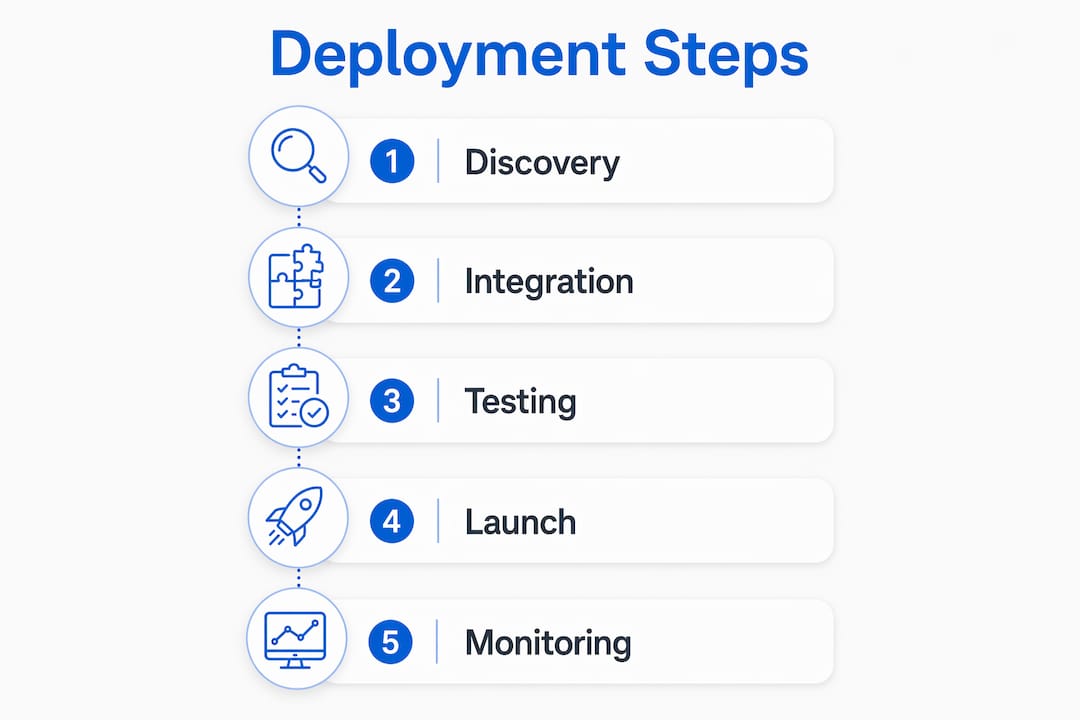
Deploying AI agents across channels is not a single event. It is a phased rollout that reduces risk and lets you validate behaviour before each new channel goes live.
- Channel discovery: Map where your customers already communicate. Deploying to existing platforms like WhatsApp or Teams drives higher adoption than asking customers to use a new interface. Prioritise channels by volume and business impact.
- Authentication setup: Configure OAuth 2.0 credentials, API keys, and webhook endpoints for each channel. Test authentication in a staging environment before connecting to production systems.
- Channel-native formatting: Each channel has its own formatting rules. WhatsApp supports rich media cards. Email supports HTML. SMS is plain text with a 160-character limit. Configure your adapter layer to handle these differences automatically.
- CRM integration: Connect your live chat AI to your CRM so that agents can surface customer history, account status, and previous interactions in real time.
- Simultaneous testing: Functional testing must run across all channels at the same time using automated frameworks. Tools like Selenium and Postman detect integration issues and API behaviour differences under load before they affect real customers.
- Staged go-live: Launch one channel at a time, monitor for 48 hours, then proceed to the next. This approach isolates issues and prevents a single misconfiguration from affecting every channel at once.
| Rollout phase | Key actions |
|---|---|
| Discovery | Audit customer channel preferences and business priorities |
| Configuration | Set up APIs, webhooks, and authentication per channel |
| Integration | Connect CRM, knowledge base, and analytics |
| Testing | Run automated functional and load tests across all channels |
| Go-live | Staged launch with 48-hour monitoring windows per channel |
| Optimisation | Review analytics, refine routing rules, and expand coverage |
How does intelligent handoff improve customer experience in multichannel deployments?
Intelligent handoff is the process of transferring a customer from an AI agent to a human agent with full context intact. It is not a fallback. It is a data-rich, deliberate handover that makes human agents more effective from the first second of the interaction.
The three components of a well-designed multichannel AI handoff process are:
- Detection: The AI recognises when it cannot resolve a query, when sentiment turns negative, or when the customer explicitly requests a human.
- Context transfer: The system packages the conversation history, identified issue, AI actions taken, and escalation reason into a structured summary for the receiving agent. This eliminates the frustrating experience of customers repeating themselves.
- Routing: The system matches the customer to the right human agent based on skill, availability, language, and customer tier. Skill-based, availability-aware routing improves both resolution speed and customer satisfaction.
“Clear customer communication during handoff, including expected wait times and the option to continue via a different channel, increases customer trust and reduces abandonment at the critical moment of escalation.”
The quality of the handoff message matters as much as the routing logic. A message that says “Connecting you to a specialist who can see your full conversation” performs far better than a generic “Please hold.”
Pro Tip: Design your handoff prompt to tell the customer what the human agent already knows. This single change reduces call handle time and increases first-contact resolution rates.
What pitfalls should you avoid after deploying multichannel AI agents?
Post-deployment is where most enterprise deployments lose momentum. The system goes live, the team moves on, and the AI slowly drifts out of alignment with real customer needs.
The most common pitfalls are:
- Fragmented experience: Agents behave differently across channels because the knowledge base was not updated consistently. Assign one owner for knowledge base governance.
- Poor context management: Sessions expire too quickly, forcing customers to restart conversations. Set session timeouts based on actual customer behaviour data, not default platform settings.
- Inadequate security reviews: Authentication configurations are set once and never reviewed. Schedule quarterly security audits as a standing calendar item.
Continuous improvement requires a feedback loop. Human resolutions that inform AI training lead to progressive improvements in automated handling over time. Every escalation is a training signal. Build a process where your team reviews escalation transcripts weekly and flags cases the AI should handle autonomously in the next update cycle.
For AI deployment at enterprise scale, monitor four metrics consistently: response latency per channel, escalation rate, conversation completion rate, and customer satisfaction score. When any metric moves outside its baseline range, investigate before it compounds.
Pro Tip: Build a cross-channel analytics view from day one. Siloed reporting per channel hides patterns that only appear when you look at the full customer journey across all touchpoints.
Key takeaways
Multichannel AI agent deployment succeeds when you combine a unified agent architecture, channel-specific adapters, and an intelligent handoff process that transfers full context to human agents.
| Point | Details |
|---|---|
| Unified architecture reduces costs | A shared agent core with channel adapters cuts maintenance costs by up to 40% versus separate bots. |
| Security must be configured correctly | OAuth 2.0, API keys, and domain restrictions protect against data breaches and service disruptions. |
| Channel selection drives adoption | Deploy to platforms where customers already communicate to reduce friction and increase uptake. |
| Intelligent handoff is not a fallback | Structured context transfer and skill-based routing make human agents more effective from the first moment. |
| Feedback loops improve AI over time | Weekly review of escalation transcripts trains the AI to handle more cases autonomously each cycle. |
My honest view on multichannel AI deployment in 2026
I have seen Australian enterprises invest heavily in multichannel AI and still deliver a disjointed customer experience. The reason is almost always the same: teams focus on connecting channels and forget to connect the data. You can have five channels live and still frustrate customers if each channel starts the conversation from scratch.
The shift I find most valuable is treating intelligent handoff as the centrepiece of the design, not an afterthought. When you design the handoff first, every other architectural decision falls into place. You know what context you need to capture, which means you know what your knowledge base must store, which means you know what your CRM integration must surface.
Australian enterprises also face a compliance pressure that offshore deployments do not. Data sovereignty is not a checkbox. It is a genuine constraint that shapes platform selection from the start. Choosing a platform that hosts data onshore removes an entire category of risk before you write a single line of configuration.
The teams that get this right are not the ones with the most features. They are the ones that mapped the customer journey before they mapped the technology. Start there, and the rest of the deployment becomes a series of solvable engineering problems rather than a series of surprises.
— Sowrabh
Conversational AI: built for Australian enterprise deployments
Australian enterprises need more than a generic AI platform. They need a solution that handles data sovereignty, integrates with existing CRM infrastructure, and scales across voice, SMS, email, and web chat without requiring a separate bot for each channel.
Conversational AI is built specifically for this. The platform hosts entirely within Australia, meets local data privacy requirements, and provides a unified agent management console across all active channels. From lead qualification to appointment booking and customer support, the enterprise AI agent solutions are designed to reduce dependency on human agents while keeping compliance intact. Contact the team to arrange a demonstration tailored to your industry and channel requirements.
FAQ
What is multichannel AI agent deployment?
Multichannel AI agent deployment means running one unified AI agent across several communication channels, including WhatsApp, email, SMS, voice, and web chat, with shared knowledge and consistent behaviour. The agent uses a single knowledge base and conversation memory regardless of which channel the customer uses.
How does the multichannel AI handoff process work?
The AI detects when it cannot resolve a query, packages the full conversation history and escalation reason into a structured summary, and routes the customer to the most suitable human agent based on skill, availability, and language. This process eliminates customer repetition and reduces resolution time.
What are the key criteria for selecting a scalable AI communication platform?
The most important criteria are onshore data hosting for Australian compliance, unified knowledge base management, CRM integration, channel adapter support, and a cross-channel analytics dashboard. Security configuration including OAuth 2.0 and API key management is also non-negotiable.
How do you test AI agents across multiple channels before go-live?
Run functional and load tests simultaneously across all channels using automated frameworks such as Selenium or Postman. Channel APIs can behave differently under peak load, so simultaneous testing is the only reliable way to detect integration issues before they affect customers.
How long does it take to deploy a multichannel AI agent?
Deployment timelines vary based on the number of channels, CRM complexity, and security requirements. A staged rollout, launching one channel at a time with 48-hour monitoring windows, is the most reliable approach and typically reduces the risk of widespread issues at go-live.