Run a gated pilot: outbound AI campaigns for Australian enterprise teams
Implementation first playbook for enterprise teams: run a gated pilot, use signal driven personalization, and meet governance plus Australian data residency.

Outbound AI campaigns use language models and workflow automation to research prospects, write personalised messages, and sequence follow‑ups across email, voice, SMS and chat, largely without a rep drafting each touch by hand. Done well, they scale personalised outreach while protecting deliverability and data control. The single next action: pilot a small, gated campaign built on high‑quality signals before you scale anything.
TL;DR:
- Successful outbound AI campaigns require a phased approach, including defining objectives, qualifying signals, and pilot testing with human approval before scaling.
- Matching the communication channel—email, voice, SMS, or chat—to specific objectives improves engagement and reduces spam risk, with hybrid sequences typically outperforming single-channel efforts.
- Prioritized signals for personalization include timing-related events like funding or hiring, which have a high impact but a short shelf life, necessitating freshness checks before outreach.
- Robust governance involves staged review gates, native CRM integrations, and detailed audit trails to protect deliverability and ensure compliance in regulated sectors.
- Continuous improvement depends on structured feedback loops, regular pattern review, and adjusting guardrails based on reply data to optimize reply quality and cost per meeting.
Table of Contents
- What are outbound AI campaigns and how do they work?
- Which channel should you use: email, voice, SMS or chat?
- Which signals actually improve AI personalisation?
- How do you build a governance layer that protects deliverability?
- What metrics show whether an outbound AI campaign is working?
- Building an implementation checklist and pilot timeline
- How Conversational AI implements outbound campaigns
- How do you choose and train the right AI model for outbound?
- What segmentation techniques does AI make possible?
- Why does CRM integration matter for outbound AI campaigns?
- How do you handle bias and ethics in AI outbound messaging?
- What testing and optimisation approaches work for AI messaging?
- How do feedback loops improve outbound AI over time?
- Lessons and trade-offs from running outbound AI
- Run a pilot with Conversational AI before you scale anything
- Sources
- FAQ
What are outbound AI campaigns and how do they work?
An outbound AI campaign is a system, not a single tool. It pulls a target list, enriches it with signals, drafts messages tailored to each contact, sends them on a schedule, watches for replies, and routes qualified conversations to a human. The shift underway in the market is away from mail‑merge templates and toward what’s often called “research‑before‑write”: the agent reads a prospect’s context first, then writes, rather than filling blanks in a fixed script. Coverage of well‑funded outbound AI vendors shows this is now where the serious money and product development are headed, not incremental template tweaks.
Running one properly means working through seven stages in order. Skip a stage and you’ll either burn a sending domain or flood your pipeline with meetings that go nowhere.
- Define the objective, target outcome and success metric. Decide upfront whether you’re chasing meetings booked, qualified leads, renewals saved or debts recovered. A campaign optimised for reply volume looks very different from one optimised for meetings with a specific job title.
- Source and qualify a signal‑rich list. Pull prospects from intent data, CRM segments, or event triggers (funding rounds, new hires, product sign‑ups) rather than a generic firmographic dump. A tighter, qualified list consistently outperforms a larger cold one.
- Author the product knowledge and guardrails the AI will draw on. This includes brand voice notes, approved claims, banned phrases, and objection‑handling logic. Treat this as a living document the AI references on every message, not a one‑off brief.
- Design the sequence and escalation rules. Map out how many touches, across which channels, before a human takes over. Decide what counts as a “hot” reply that skips the queue.
- Set human handoff points. Define exactly which reply types (a question about pricing, a complaint, a legal query) must go straight to a person, never to another AI turn.
- Pilot at a small, gated scale. Start with a capped daily send volume and a review mode where a human approves messages before they go out.
- Evaluate against the metric you defined in step one, then widen the gate. Only increase autonomy and volume once the pilot clears your success threshold.
Industry commentary on outbound sales agents notes they’re moving past single‑message drafting toward longer‑running agents that progress opportunities across the whole sales cycle, which changes how you should think about step six. A pilot isn’t just testing message quality anymore. It’s testing whether the agent can hold context across three or four interactions without losing the thread.
Pro Tip: Write your banned‑phrase list before you write your value proposition. It’s far easier to catch a compliance problem in a static document than in a live message that’s already landed in 200 inboxes.
Which channel should you use: email, voice, SMS or chat?
Each channel does one job well and fails badly outside it. Matching the channel to the objective, rather than defaulting to whichever tool you already own, is the difference between a campaign that books meetings and one that gets marked as spam.
- Email suits complex, considered offers where the prospect needs time to read and forward internally. It’s the right channel for enterprise lead qualification and renewal nudges where a written record matters.
- Voice agents work best for high‑urgency, high‑volume outreach where a live conversation qualifies intent fast. Vendor documentation on outbound voice agents describes dialling at scale, detecting voicemail automatically, and routing live connects straight to a human for booking or qualification. That’s the right shape for appointment setting and early‑stage collections calls.
- SMS is built for short, time‑sensitive nudges: appointment reminders, payment due dates, or a one‑line follow‑up after a voice call goes to voicemail. Keep it to single, clear asks.
- Chat agents handle inbound curiosity generated by an outbound touch, answering questions the moment a prospect clicks through from an email or ad.
Hybrid sequences generally outperform single‑channel ones. A common pattern for collections is voice first (a live call attempt), SMS as the fallback when the call isn’t answered, then email for the formal record. For lead qualification, email opens the sequence, a chat agent handles inbound replies to booking links, and voice closes the loop for prospects who’ve gone quiet after two email touches. The rule that holds across all of them: escalate to a human the moment a reply signals confusion, complaint or a legal question, regardless of which channel it arrived on.
Which signals actually improve AI personalisation?
Not all data earns its place in a message. Some signals genuinely change what you should say to a prospect; others just make an email look busier without making it more relevant.
Timing and intention signals carry the most weight. A recent funding round, a new senior hire in a relevant function, or repeated visits to a specific product page tell you why now matters to this contact, which is the hardest thing to fake in a cold message. Firmographic and role context (company size, industry, seniority) matter less on their own but help you choose the right message template and avoid pitching an enterprise feature to a five‑person business.
CRM events and third‑party enrichment sit in between. A CRM event, like a support ticket closed six weeks ago or a demo that went cold, gives you a genuine reason to reach back out. Third‑party enrichment data (job title changes, tech stack detection) is useful but decays fast, so treat it as a hint rather than a fact until it’s checked.
- Intent and timing signals: funding announcements, hiring surges, pricing‑page visits. Highest personalisation value, shortest shelf life.
- Firmographic and role data: company size, industry, seniority. Useful for template selection, weak on its own for personalisation.
- CRM history: past deals, support tickets, previous rep notes. Strong for re‑engagement campaigns specifically.
- Third‑party enrichment: job changes, tech stack, social activity. Needs a freshness check before use.
Building outreach around live, verifiable events instead of generic templates is one of the clearer patterns in how outbound teams describe improved reply quality, though the size of the improvement varies by list and industry. The practical discipline that matters more than any single signal source is a freshness check: before a campaign goes live, spot‑check a sample of records against the actual source (the funding announcement, the job posting) rather than trusting an enrichment vendor’s cache. Stale personalisation, a “congratulations on your new role” sent four months late, is worse than none at all. Conversational AI’s approach to signal‑based orchestration is built around exactly this timing problem: matching the outreach moment to the event, not the batch schedule.
How do you build a governance layer that protects deliverability?
The technical workflow matters as much as the message content, because a well‑written email sent through a burned domain never gets read. Governance here means controlling three things: who approves what, where messages send from, and how replies get classified.
Start with review gates. Most enterprise deployments run three modes in sequence: preview (every message queued for human approval before sending), supervised (the AI sends autonomously but flags anything unusual for review), and autonomous (full send rights within pre‑agreed rules). Moving through these gates slowly is what separates a controlled rollout from a reputational incident. Vendor documentation on multi‑step outbound sequencing shows this staged‑gate pattern as a standard control mechanism across serious platforms, not an optional extra.
Sending architecture is the next layer. Sending from a rep’s actual inbox via OAuth (rather than a shared bulk‑sending address) tends to protect domain reputation better, because it mirrors normal human sending behaviour. Where you must send from an organisational domain, multi‑provider routing and staged rate caps reduce the risk of one bad batch tanking your whole domain’s reputation.
- Set explicit rate caps per sending identity, not just per campaign.
- Classify replies automatically (interested, not now, wrong contact, opt‑out) and route each category to a different CRM queue.
- Log every send, edit and approval in an audit trail your compliance team can pull on demand.
- Handle do‑not‑contact requests instantly and permanently, across every channel the contact appears in.
- Confirm data residency and storage location before a pilot touches any regulated customer data.
Enterprise procurement conversations increasingly treat audit trails, data residency and review modes as deciding factors, not nice‑to‑haves sitting alongside reply‑rate numbers. That’s a meaningful shift from a few years ago, when raw response rate was the only number anyone asked about in a vendor pitch.
What metrics show whether an outbound AI campaign is working?
The engagement funnel for outbound AI campaigns runs sent → delivered → opened → clicked → replied → qualified lead → meeting booked → pipeline created. Watching only the top of that funnel (sends and opens) hides the problems that actually kill a campaign.
Cost per meeting is the number that matters most to a decision‑maker approving budget. Calculate it by dividing total campaign cost (platform fees, list acquisition, any human review time) by meetings booked in a given period.
- Delivered rate below 95% usually signals a sending authentication problem, not a content problem.
- Open rate dropping mid‑campaign often means a spam filter has started flagging the domain or subject line pattern.
- Reply rate high, qualified‑lead rate low points to messaging that’s engaging but poorly targeted, or a list with the wrong buyer role.
- Meetings booked but low show‑up rate suggests the booking flow, not the messaging, needs fixing.
A campaign that clears delivery and open benchmarks but stalls at the reply‑to‑qualified step is almost always a targeting problem, not a copywriting one. Fix the list before you rewrite the message.
Building an implementation checklist and pilot timeline
A pilot that skips pre‑launch checks tends to surface its problems in front of prospects rather than in a test environment, which is the expensive way to learn.
- Verify sending authentication. Confirm SPF, DKIM and DMARC records are correctly configured for every domain or subdomain you’ll send from, well before the first message goes out.
- Run a data hygiene pass. Deduplicate the list, strip invalid addresses, and confirm consent status against your compliance requirements.
- Complete a compliance review. Check the list and message copy against relevant privacy and telemarketing rules for every region you’re contacting.
- Align stakeholders on the gate criteria. Get sales, compliance and whoever owns the sending domain to agree on what “pass” looks like before the pilot starts, not after.
- Size and schedule the pilot. A sample of a few hundred contacts run over two to four weeks is a common starting point, long enough to see real reply patterns without risking a large list.
- Set the review gate for pilot exit. Define the reply‑quality and deliverability thresholds that trigger a move from supervised to more autonomous sending.
- Plan the scale‑up handover. Decide who owns ongoing monitoring once the pilot graduates, and what response‑time SLA that person or team is held to.
Vendor and case examples of outbound AI deployments consistently describe pilots taking days to weeks to configure, followed by several weeks of live testing before performance stabilises. Budget for that runway rather than expecting week‑one numbers to reflect steady‑state performance. Conversational AI’s guidance on multichannel follow‑up setup walks through this staging in more detail for teams building their first sequence.
How Conversational AI implements outbound campaigns
Conversational AI’s platform maps directly onto the governance pattern described above: multichannel agents across voice, SMS, email and chat, all connected to your CRM, all hosted on Australian infrastructure for data residency. A pilot typically starts in a preview‑style review mode, where every AI‑drafted message or call script is approved before it goes out, then moves to supervised sending once reply classification and audit logging show consistent, expected patterns.
Three use cases show the pattern clearly:
- Lead qualification: voice or chat agents work an inbound list, with a gate check on any reply flagged as a complex objection before it reaches a human rep.
- Appointment booking: SMS and voice combine to confirm and reschedule, with audit logs tracking every change for compliance review.
- Collections: outbound voice and SMS sequences follow strict do‑not‑contact handling, with every interaction logged for dispute resolution.
Enterprise teams adopting outbound AI care about the audit trail as much as the reply rate. Knowing exactly what was sent, to whom, and who approved it, is what lets a compliance team sign off on scaling a pilot into a production campaign.
How do you choose and train the right AI model for outbound?
Model choice depends on what the campaign actually needs to do, not which model has the biggest headline benchmark score. A model handling short SMS confirmations doesn’t need the same reasoning depth as one drafting a personalised cold email that references a prospect’s recent funding round and ties it to a specific product benefit.
For voice agents, latency and natural turn‑taking matter more than raw language sophistication. A model that pauses awkwardly mid‑sentence loses a prospect’s trust in the first ten seconds, regardless of how well it understands the conversation. For email and chat drafting, the priority shifts to consistency: the same model should produce messages that stay on‑brand across thousands of variations, not just impressive one‑off samples in a demo.
Training, in practice, means feeding the model your guardrail document from step three of the campaign process: approved claims, banned phrases, tone examples, and objection‑handling logic. Most enterprise platforms let you fine‑tune this through prompt engineering and reference examples rather than retraining a model from scratch, which is faster and easier to audit. Run a held‑out test batch, a set of prospects the model has never seen, and have a human score the outputs against your brand guidelines before any message reaches a real inbox. Retest after every significant guardrail change, not just at initial setup.
What segmentation techniques does AI make possible?
Traditional segmentation splits a list by industry, company size or job title and stops there. AI‑driven segmentation adds behavioural and temporal layers that a spreadsheet filter can’t reach: it clusters prospects by how they’re likely to respond, not just who they are on paper.
One practical technique is intent clustering: grouping prospects by the specific signal that triggered their inclusion (a funding event versus a hiring surge versus a competitor mention) and writing a distinct message angle for each cluster, rather than one generic message for the whole list. A prospect who just hired a head of operations needs a different opening line than one who just closed a funding round, even if they sit in the same industry and company‑size bracket.
A second technique is response‑pattern segmentation, where the AI adjusts future targeting based on how similar prospects have responded in past campaigns. If mid‑market finance contacts consistently engage more with voice than email, the system can weight future finance‑sector outreach toward voice‑first sequences automatically.
A third is negative segmentation, actively excluding prospects who match disengagement patterns (three unanswered touches, a previous opt‑out at a related company) before they ever enter a new sequence. This matters more than it sounds. A list that quietly re‑includes disengaged contacts is one of the fastest ways to damage sender reputation without noticing why open rates are sliding.
The common thread across all three is that AI segmentation works from behaviour and signal freshness, not static attributes fixed at the point a contact was added to the CRM.
Why does CRM integration matter for outbound AI campaigns?
An outbound AI campaign that doesn’t sync cleanly with your CRM creates duplicate work almost immediately: reps chasing leads the AI already qualified, or the AI recontacting someone a rep closed last week. Integration is what turns a standalone messaging tool into part of the actual sales system.
The core requirement is two‑way sync. The AI needs to read CRM data (deal stage, past interactions, ownership) before it drafts a message, and it needs to write back (reply classification, engagement history, next‑step recommendation) so a human picking up the thread has full context. Without that write‑back, you end up with two separate records of the same conversation, which is exactly the kind of gap that causes an embarrassing double‑contact.
Marketing automation platforms add a second layer: campaigns that trigger based on lifecycle stage, so a prospect who downloads a resource automatically enters a qualification sequence, and one who books a meeting drops out of any parallel outbound cadence immediately. That handoff logic prevents the common failure where a prospect gets a “still interested?” email the same day they’ve booked a demo call.
Practically, this means checking two things before you commit to a platform: does it support real‑time (not batch) sync with your specific CRM, and does it let you define trigger rules based on CRM fields you actually use. Conversational AI’s CRM integration is built around this bidirectional sync requirement specifically for teams that can’t tolerate a lag between what the AI sees and what the sales floor sees.
How do you handle bias and ethics in AI outbound messaging?
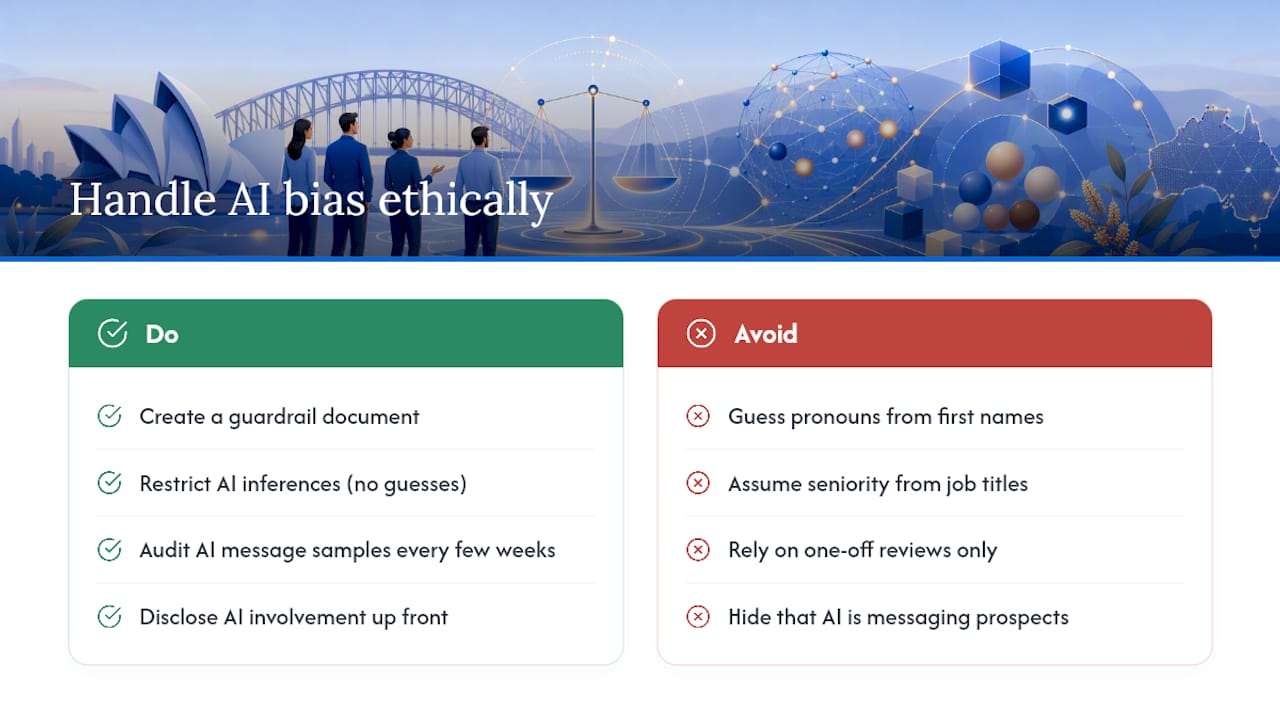
AI models trained on broad internet text carry the biases in that text, and outbound messaging is a place those biases can surface in ways that damage both compliance standing and brand trust. A model might, for instance, default to more formal language for certain name patterns or make assumptions about seniority based on job title phrasing that doesn’t hold across industries or cultures.
The practical fix starts with the guardrail document from the campaign process: explicit rules about what the AI can and can’t infer about a prospect. If the AI has no reliable signal about a contact’s gender, it shouldn’t guess from a first name to select pronouns or tone. If it has no verified seniority signal, it shouldn’t assume decision‑making authority from a job title alone, since titles vary wildly between companies.
Regular auditing matters more than a one‑off review at launch. Pull a sample of AI‑generated messages every few weeks and check for patterns: is the tone shifting for contacts with certain name origins, is one segment getting noticeably shorter or more generic messages than another. These patterns are subtle and easy to miss without a deliberate check.
Transparency is the other half of the ethical picture. Prospects increasingly expect to know when they’re interacting with an AI agent, particularly on voice and chat channels where the distinction isn’t always obvious from tone alone. Disclosing AI involvement upfront, rather than letting a prospect discover it mid‑conversation, tends to preserve trust even when the prospect would have preferred a human. Building that disclosure into your sequence design isn’t just good practice, it also reduces the compliance exposure if your jurisdiction’s rules around automated communication require it.
What testing and optimisation approaches work for AI messaging?
Standard A/B testing still applies to outbound AI, but the variable you’re testing shifts. Instead of testing two static subject lines, you’re often testing two different guardrail configurations, two research‑before‑write approaches, or two sequencing logics, and comparing which produces better reply quality across a matched sample of prospects.
Run tests on message structure separately from message content. A test that varies both the opening hook and the call‑to‑action at once won’t tell you which change actually moved the needle. Isolate one variable, run it across a large enough sample to see a real pattern, then move to the next.
Multivariate testing works better for AI campaigns than it does for manually written ones, because the AI can generate genuine variations at scale without the labour cost of a human writing ten versions of the same email. Use that scale deliberately: test three or four distinct personalisation angles (referencing a funding event versus a hiring signal versus a product‑usage pattern) against the same list segment, and let the reply data tell you which signal type resonates most for that specific audience.
The optimisation cycle that matters most isn’t tweaking copy after the fact, it’s tightening the guardrail document itself based on what the tests reveal. If messages referencing hiring signals consistently outperform ones referencing funding, update the prioritisation rule that decides which signal the AI leads with, rather than just noting it as an interesting result. That’s the difference between a test that produces a chart and a test that actually changes future campaign performance.
How do feedback loops improve outbound AI over time?
A campaign that never learns from its own results is just an expensive way to send the same mediocre message forever. The improvement comes from a structured feedback loop: reply classification data feeds back into the model’s future decisions, not just into a dashboard someone glances at monthly.
Set up the loop in three parts. First, every reply gets classified (interested, not now, wrong contact, complaint, opt‑out) and that classification links back to the specific signal, message variant and sequence step that produced it. Second, run a regular review, weekly during a pilot, monthly once stable, where a human checks whether the AI’s own classification matches reality on a sample of replies. Third, feed confirmed patterns back into the guardrail document and prioritisation rules, so the system’s next batch of messages reflects what actually worked, not just what the original brief assumed would work.
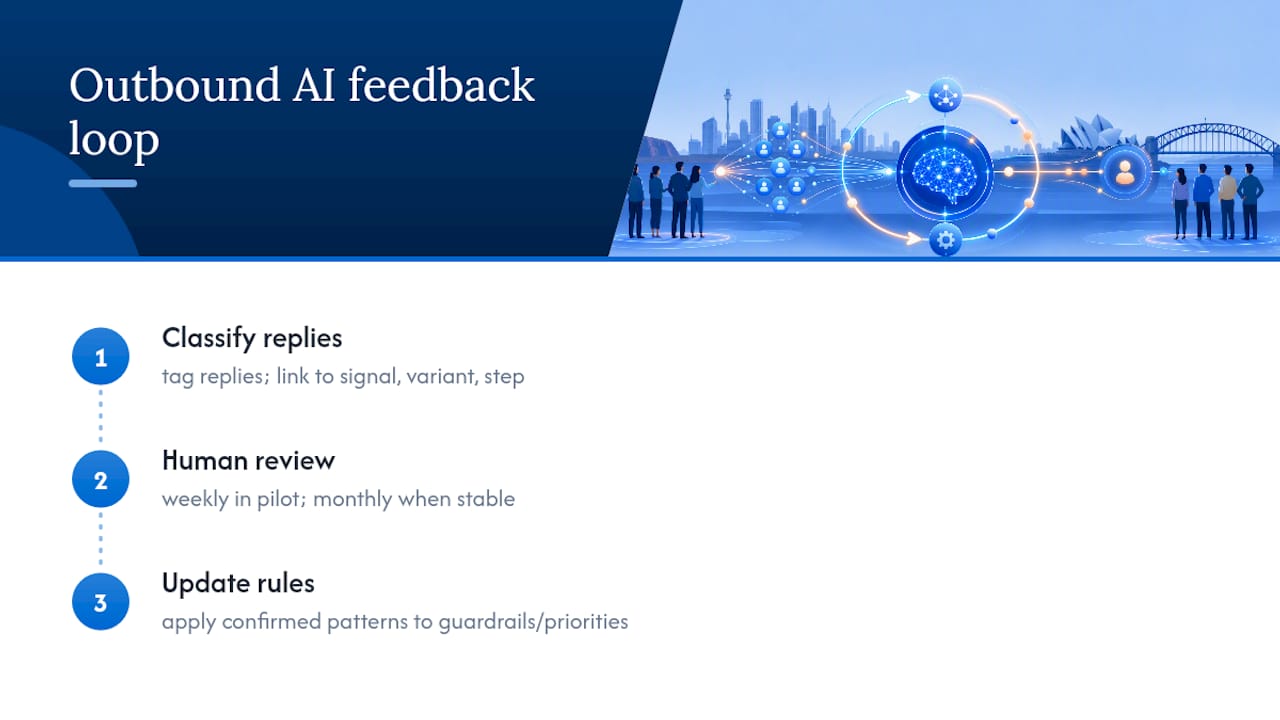
The mistake to avoid is treating the feedback loop as fully automatic. A model can detect a pattern (finance contacts reply better to a shorter message) without understanding why, and that pattern might reverse next quarter for reasons the data doesn’t capture, a change in the economic climate, a competitor’s messaging shift. Human review of the pattern before it gets baked into a rule is what stops a short‑term fluctuation from becoming a permanent, wrong assumption.
Over a full campaign cycle, this loop is what separates a system that plateaus after the first month from one that keeps improving its cost per meeting quarter over quarter.
Lessons and trade-offs from running outbound AI
The real trade‑off in outbound AI isn’t personalisation versus scale, it’s autonomy versus control, and most teams grant too much autonomy too early. Every lesson in this guide points back to the same discipline: build the review gate before you build the sequence. Get that order backwards and you’ll be explaining to a compliance officer why 2,000 contacts got a message nobody approved.
— Sowrabh
Run a pilot with Conversational AI before you scale anything
This platform gives you a way to run that gated pilot without stitching together five separate tools yourself. It is hosted within Australia, meaning prospect and customer data remains under Australian data sovereignty rules rather than routing through offshore servers, which matters for sectors with strict data privacy requirements. The system’s voice, SMS, email and chat agents integrate with CRM, so the review gates, reply classification and audit logging described earlier in this guide are included as part of the solution.
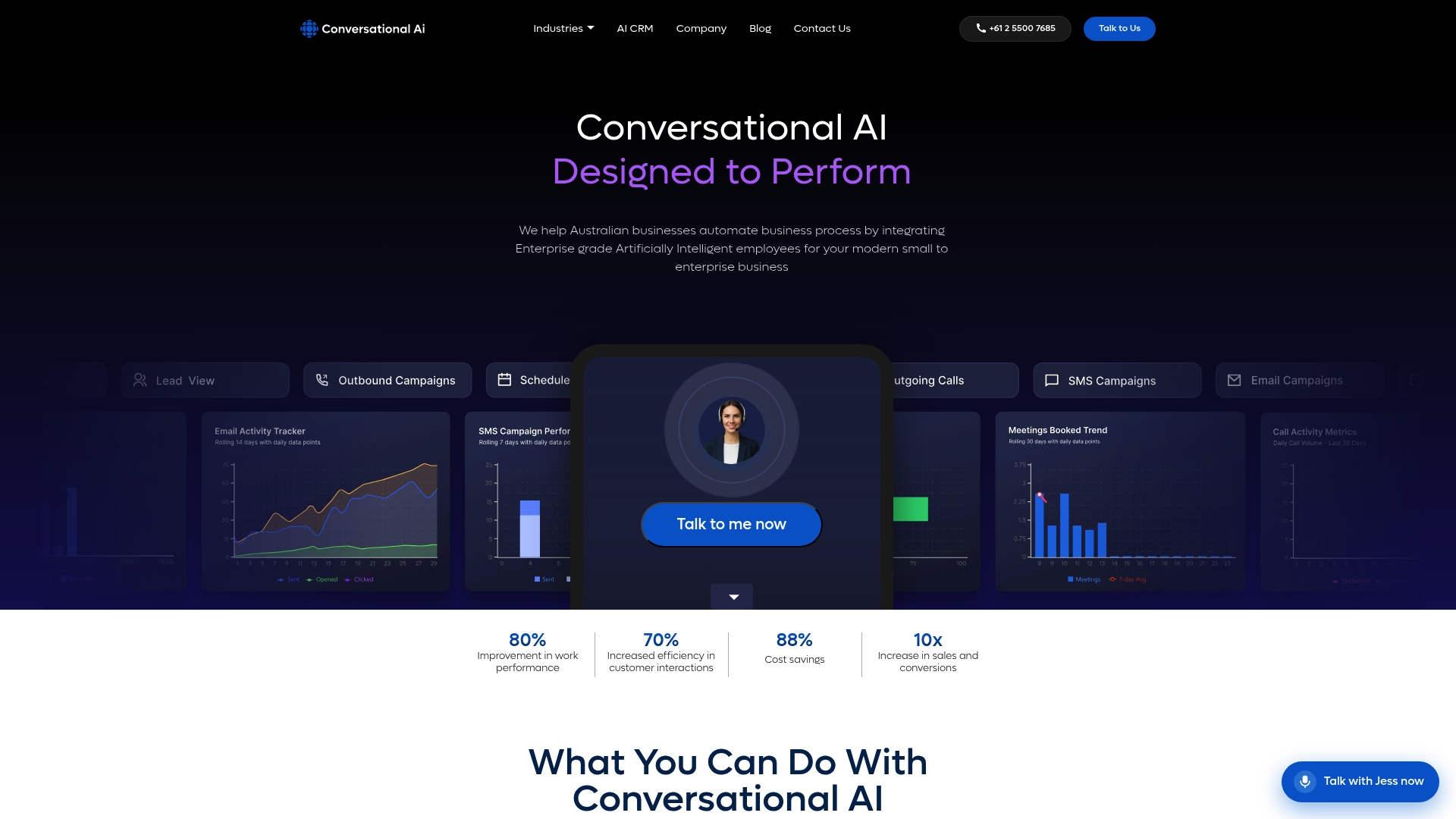
For a sales team, that means less time reconciling three systems and more time on the calls the AI qualifies. For an operations lead, it means an audit trail that’s ready before a compliance review even asks for one. Start by checking the Conversational AI CRM page to see how the sync works, or look at the full platform overview to map its agent types against the channel mix your campaign needs. If your outbound work touches regulated collections or healthcare communication specifically, the debt collection and healthcare pages walk through use‑case specific gate checks. Book a walkthrough to see a preview‑mode pilot configured against your own list.
Sources
- New York Times — coverage of outbound AI startup fundraising and product evolution
- LinkedIn — How AI transforms outbound marketing strategies
FAQ
What does “AI outbound” mean?
AI outbound refers to using AI agents to research prospects, draft personalised messages, and manage sequencing and follow‑up across channels like email, voice, SMS and chat, largely without a person writing each message by hand.
What are the best AI advertising campaigns right now?
The strongest performers in 2026 combine research‑before‑write personalisation with staged review gates and multichannel sequencing, rather than relying on a single static template sent to a broad list. Coverage of fast‑growing outbound AI vendors shows this signal‑driven approach is where the category is heading.
What are examples of outbound marketing?
Outbound marketing includes cold email sequences, outbound calling, direct mail, trade show outreach and paid advertising aimed at prospects who haven’t yet engaged with your brand. AI‑driven outbound campaigns automate the research, personalisation and follow‑up steps within these same channels.
Is AI outbound calling legal?
AI outbound calling is legal in most jurisdictions when it follows the same telemarketing, consent and do‑not‑contact rules that apply to human‑made calls, though specific requirements vary by country and sector. Check your local telemarketing regulations and consent requirements before launching, and build do‑not‑contact handling into the sequence from day one rather than adding it later.
What does Conversational AI cost for outbound campaigns?
Conversational AI doesn’t publish fixed pricing for its outbound campaign features. Current pricing is available directly on the Conversational AI site or through a consultation for your specific channel and volume needs.