4 Calendar Paths for Enterprise Chatbots: Hosted in Australia Wins
Compare four calendar chatbot integration approaches, use a developer checklist, and see why hosting in Australia fits regulated enterprises.

For most enterprise teams, a direct API integration or a hosted enterprise platform beats no-code tools once you need compliance, data control, or scale. OAuth 2.0 is the non-negotiable foundation underneath every option. This guide walks you through a developer checklist, sync patterns, and the deployment controls that matter once you move past a pilot.
TL;DR:
- No-code tools are suitable for initial demand validation but become limiting once multiple calendars or privacy requirements are involved.
- OAuth 2.0 ensures secure, delegated access, with best practices including requesting minimal scopes, securely storing tokens, and handling refreshes gracefully.
- Batch processing and idempotent writes prevent quota limits and duplicate events, especially at scale, by queuing API calls and attaching unique request identifiers.
- Handling recurring events and exceptions, daylight saving changes, and webhook failures are critical to maintaining reliable calendar synchronization.
- Using an Australia-hosted platform guarantees data residency and simplifies compliance in regulated sectors, integrating multichannel communication with calendar and CRM data all within local infrastructure.
Table of Contents
- Comparing calendar integration chatbot approaches
- How do OAuth 2.0 and calendar APIs work together?
- Architecture patterns that keep calendar bots reliable
- Step-by-step checklist for building the integration
- What edge cases break calendar chatbots?
- Security and compliance considerations for enterprise deployment
- Author perspective: practical pitfalls and fast wins
- Why an Australia-hosted platform solves the calendar integration problem for good
- Sources
- FAQ
Comparing calendar integration chatbot approaches
Four paths get a chatbot talking to a calendar, and each suits a different buyer.
- No-code platforms (Zapier, Make): fastest to launch, built for simple trigger and action workflows, but limited when logic gets complex. Zapier’s ChatBot integration shows how quickly a basic booking flow ships without writing code.
- Integration Platform as a Service (IPaaS): sits between no-code and custom build, offering more branching logic and error handling than a pure automation tool, still hosted by a third party.
- Direct API integration: full control over authentication, data handling, and business logic, at the cost of engineering time. This is where most calendar integration chatbot projects end up once requirements grow.
- Hosted enterprise platform: pre-built multichannel infrastructure with calendar sync included, suited to regulated sectors that need data residency guarantees alongside speed.
Pilot on a no-code tool when you’re validating demand. Move to direct API or an enterprise platform once you’re handling attendee data, multiple calendars, or anything subject to privacy obligations. The moment “customisable” becomes a requirement, Make’s documented actions for create, delete, and free/busy queries start to feel like a ceiling rather than a shortcut.
How do OAuth 2.0 and calendar APIs work together?
Every serious calendar bot integration runs on the same authentication backbone. OAuth 2.0’s authorization code flow lets a user grant a chatbot delegated access without ever handing over a password, and the resulting refresh token keeps that access alive without repeated logins.
- Request minimal scopes. Ask only for what the booking flow needs. Read-only free/busy access is a different risk profile to full read/write on someone’s primary calendar.
- Exchange the authorization code for tokens. Store the refresh token securely; use the short-lived access token for actual API calls.
- Call the core calendar operations: get events, free/busy queries, create, update, and delete events, plus attendee and organiser fields for meeting invites.
- Choose your sync model. Webhook push notifications give near-instant updates; polling is simpler to build but adds latency. Some open-source calendar sync projects run polling cycles as tight as every 60 seconds where webhooks aren’t practical.
Push notifications win on responsiveness. Polling wins on simplicity, particularly during early builds where webhook infrastructure isn’t worth the setup cost yet.
Architecture patterns that keep calendar bots reliable
Rate limits are the first wall every calendar integration chatbot hits at scale. Sequential API calls queue up and slow the whole booking flow, so batching and parallel sync queues matter far more than they look on paper. Open-source implementations commonly batch multi-change updates and run multiple concurrent calls rather than firing requests one at a time, cutting latency while staying under quota.
Idempotent writes matter just as much. Attach a client-generated request ID or event hash to every booking so a retried call, or a duplicate call from a parallel worker, doesn’t create the same meeting twice.
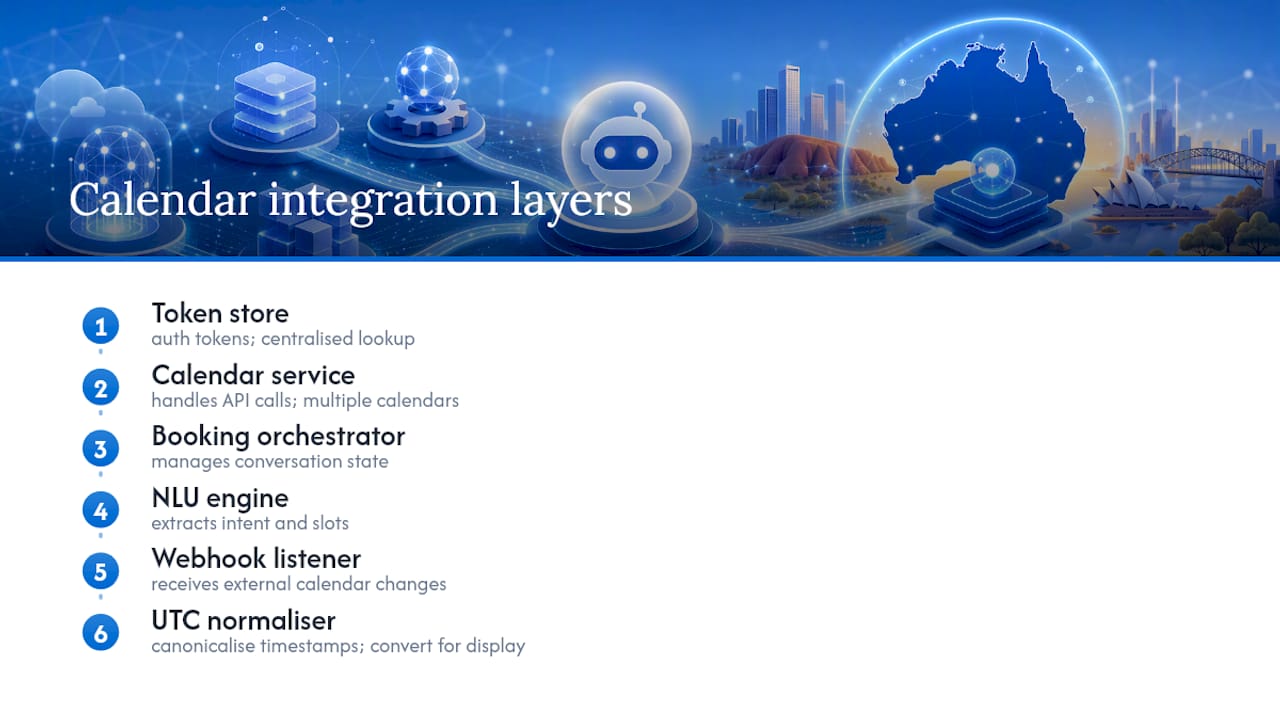
Split the system into distinct layers: a token store for authentication, a calendar service handling API calls, a booking orchestrator managing the conversation state, an NLU engine extracting intent and slots, and a webhook listener for incoming changes. When a business runs multiple calendars, decide early which one is the source of truth, and canonicalise every timestamp to UTC internally before converting for display.
Pro Tip: Store timezone offsets separately from the display string. A meeting saved as “3pm AEDT” without its UTC equivalent will drift the moment daylight saving shifts.
Step-by-step checklist for building the integration
Follow this order and you’ll avoid most of the rework teams hit on their first calendar bot integration.
Setup
- Enable the calendar API in your developer console and create an OAuth client.
- Define the narrowest scope set your booking flow actually needs.
- Build a consent screen that states plainly what the chatbot can read and write.
Authentication 4. Implement the authorization code flow end to end. 5. Persist refresh tokens encrypted, never in plain text or client-side storage. 6. Handle token refresh and expiry gracefully, with a clear re-auth prompt when it fails.
Understanding the request 7. Extract meeting duration, participants, and preferred windows from the user’s message. 8. Normalise every time reference against the user’s known timezone, not the server’s.
Booking flow
- Check free/busy across relevant calendars.
- Assemble two or three candidate slots and let the user pick, rather than booking the first available.
- Confirm and write the event, attach reminders, and push the record to your CRM.
Operations
- Log every webhook event and booking action for audit purposes.
- Build retry logic with backoff for failed calendar writes.
Projects like Calvin, built with LangChain and the Google API client, demonstrate this exact structure in working code, which is worth studying before you architect your own.
What edge cases break calendar chatbots?
Daylight saving transitions and recurring-event exceptions cause more support tickets than any other calendar bug. A recurring weekly meeting with one instance moved or cancelled needs your integration to respect that single exception, not just the base recurrence rule.
Build for these before launch:
- Automated end-to-end tests covering both the happy path and cancelled, rescheduled, and declined-invite paths.
- Explicit handling for shared and read-only calendars, where a write attempt will simply fail.
- Fallback messaging for when a user revokes consent mid-conversation, so the bot degrades gracefully instead of erroring silently.
- Monitoring for webhook dead letters and API quota warnings, with a manual escalation path when automated retries exhaust.
Calendar agent implementations combining an LLM with the Google Calendar API illustrate this well: real-time sync and conflict detection only work if the underlying event handling accounts for recurrence and RSVP status, not just single, one-off bookings.
Security and compliance considerations for enterprise deployment
Where your calendar data lives is a decision, not a default. Third-party IPaaS tools route data through their own infrastructure, which is fine for a pilot but a genuine problem once healthcare, finance, or professional services clients ask where their booking records sit. An Australia-hosted platform keeps that data inside the jurisdiction it needs to stay in.
Token security in practice: for multi-tenant deployments, separate token stores per tenant with independent encryption keys and dedicated webhook endpoints limit how far a single leaked credential can spread. One compromised tenant token should never expose another client’s calendar.
Rotate OAuth tokens regularly, prefer short-lived access tokens over long-lived ones wherever the API supports it, and keep an audit trail of every consent grant, scope change, and calendar write. Add circuit breakers for calendar API outages so a failed provider call fails safely instead of leaving a booking half-completed, and alert on quota consumption before you hit a hard limit rather than after.
Author perspective: practical pitfalls and fast wins
The failures that actually take down calendar bots in production are boring: an expired refresh token nobody caught, a scope that was too narrow for a feature added six months later, a recurring-event exception nobody tested. Standard meeting templates and default durations fix more slot-selection headaches than smarter NLU ever will. Build in-house once your compliance obligations or booking volume outgrow what a no-code tool can audit; buy when speed matters more than control.
— Sowrabh
Why an Australia-hosted platform solves the calendar integration problem for good
Zapier and Make get a booking bot running fast, and direct API work gives you full control. Some Australia-hosted private cloud platforms handle calendar sync alongside voice, SMS, email, and live chat in one system, with CRM integration and contextual memory built in.
For regulated sectors like healthcare, finance, and professional services, that means calendar and booking data never leaves Australian infrastructure, and your team isn’t stitching together five separate tools to get multichannel scheduling working reliably. If you’re evaluating how to route customer bookings, follow-ups, and CRM updates through one auditable system, get in touch through Conversational AI to talk through a demo for your use case.
Sources
For OAuth flows and batching patterns, see BeeBombshell/brilliant. For a full-stack build example, see GoogleCalendarAssistant, and for conversation design, see Raw.
- BeeBombshell/brilliant
- Calendar Agent (Google Gemini + Google Calendar)
- ChatBot.com Google Calendar Integration - Quick Connect
FAQ
Is there an AI that can manage my calendar?
Yes. Calendar agent tools combining an LLM with the Google Calendar API can already check availability, propose meeting slots, and write events directly, and enterprise platforms extend this across multiple channels.
What is the best calendar integration app?
There’s no single best option. Zapier or Make suit a fast pilot, direct API integration suits teams needing full control, and a hosted enterprise platform like Conversational AI suits regulated businesses needing data residency and multichannel support together.
Can ChatGPT make me a calendar?
ChatGPT itself doesn’t hold write access to your calendar by default, but it can generate schedules or event text you then add manually, or power a connected chatbot that writes events via the Google Calendar API once OAuth is configured.
Is there a Discord bot that can connect to Google Calendar?
Yes, several open-source Discord bots connect to Google Calendar using OAuth 2.0 and the standard calendar API, following the same authentication and event creation pattern used across most calendar bot projects.
How often should a calendar bot sync with the calendar?
Webhook push notifications give near-instant sync, while polling models commonly run as frequently as every 60 seconds when webhooks aren’t practical for the platform.