No Frontend Secrets: Secure Chatbot API Integration for Enterprise
Security first playbook for developers integrating chat APIs. Use a backend proxy, session IDs, streaming for live UIs, and OWASP based controls.

For most production chatbots, expose a server-side chat API that manages secrets and session continuity, choosing REST for backend automation and streaming (SSE or WebSockets) for low-latency UIs. Authenticate with rotating bearer tokens behind a backend proxy, keep a session ID header alive across a conversation, and handle 429 responses with exponential backoff. Reach a security and data-boundary decision before you write a single line of integration code.
TL;DR:
- Most chatbots rely on server-side APIs with session IDs to maintain context, using REST for automation and streaming for real-time user interactions.
- Authentication should involve rotating bearer tokens behind a backend proxy, never exposing API keys to client devices, with request signing for trust boundaries.
- Streaming protocols like SSE and WebSockets are recommended for human-facing applications, but introduce failure modes requiring reconnection and deduplication logic.
- Using SDKs is beneficial when handling event subscriptions or automatic reconnection, but avoid mixing SDKs with raw REST calls to prevent message mismatches.
- Secure integration requires a backend proxy, strict data boundary policies, proper rate-limit handling, and validation of external tool calls to prevent injection risks.
Table of Contents
- What does chatbot API integration actually involve?
- Which authentication pattern should you use?
- Should you use streaming or plain REST?
- When should you use an SDK instead of raw REST calls?
- How do you call external APIs or tools from a chatbot?
- What security and privacy controls does a chatbot API need?
- How should your client handle rate limits and errors?
- How do you wire a backend to a chat API in practice?
- How do you test and monitor a chatbot integration in production?
- What I’d tell any team starting this build
- How Conversational AI supports enterprise-grade integration
- Sources
- FAQ
What does chatbot API integration actually involve?
Chatbot API integration is the work of connecting a chat engine (yours or a provider’s) to the channels, databases and business systems a conversation needs to touch. At its core, every rest api chatbot exposes a small, predictable set of endpoints, and once you’ve seen one provider’s shape, the rest read like dialects of the same language.
You’ll typically work with:
- A send message endpoint that accepts a JSON payload (user text, metadata, optional attachments) and returns a reply plus a session identifier.
- A history/list messages endpoint for retrieving prior turns in a conversation.
- A session management endpoint for creating, refreshing or closing a conversation context.
- A realtime listen endpoint (SSE, WebSocket, or webhook callback) for streaming replies or asynchronous events.
Responses generally carry a session ID in a header or the JSON body itself. Reuse that same ID on every subsequent request rather than generating a new one per message. That’s what gives the bot contextual memory instead of amnesia. JSON remains the dominant format here because it’s trivial to validate, log and diff across server-to-server calls. Expect standard HTTP status codes: 200 for success, 4xx for bad input or auth failure, and 5xx when the provider itself is having a bad day. Start a fresh session on explicit user reset, a long idle timeout, or a channel switch, not on every request.
Which authentication pattern should you use?
Three patterns dominate real-world chatbot integration for chatbots: static API keys, OAuth2, and signed or JWT-based headers. Pick based on who’s calling the API and how much delegation you need, not on habit.
- API key or bearer token: simplest option, fine for server-to-server calls where your backend is the only caller.
- OAuth2: necessary when a chatbot acts on behalf of a specific end user (reading their calendar, their CRM record) rather than as a generic service account.
- JWT or signed headers: used when a provider wants tamper-proof, timestamped requests, common in enterprise and webhook scenarios.
The pattern that matters most, regardless of which auth method you pick, is the backend proxy. Never let an API key touch the browser or a mobile client. Your frontend talks to your own backend; your backend holds the provider credentials, signs requests, and forwards only what’s necessary. Rotate keys on a schedule, and issue short-lived session tokens to the frontend rather than long-lived provider secrets.
A typical authenticated request header looks like this:
Authorization: Bearer sk_live_xxxxxxxxxxxxxxxx
X-Session-Id: 8f14e45f-ceea-467e-bd97-...
Content-Type: application/json
Pro Tip: If a provider supports request signing (HMAC over the payload plus a timestamp), use it for any webhook or server-to-server call that crosses a trust boundary — it stops replay attacks that a bearer token alone can’t catch.
Should you use streaming or plain REST?
Choose REST when a bot runs inside an automated workflow (a backend job, a batch process, an internal tool) with no human staring at a screen waiting for words to appear. Choose SSE or WebSockets when a human is watching the reply arrive live, because token-by-token streaming turns a two-second wait into something that feels instant.
- REST is simpler to test, cache and retry. There’s no persistent connection to manage.
- SSE suits one-way token streaming from server to client, works over standard HTTP, and survives most corporate proxies better than raw WebSockets.
- WebSockets are the right call when you need bidirectional flow, such as live-agent handover, where a human operator and the bot need to exchange signals in both directions mid-conversation.
Streaming introduces failure modes REST doesn’t have. Clients need partial-output handling (render what’s arrived, don’t wait for the full message), reconnection logic if the stream drops mid-sentence, and deduplication so a reconnect doesn’t replay tokens you’ve already shown. Provider SDKs typically handle reconnection and event framing for you, which is often reason enough to use one for anything streaming-heavy.
When should you use an SDK instead of raw REST calls?
Official SDKs earn their keep when you need event subscriptions, automatic reconnection, or typed request and response objects instead of raw JSON you validate by hand. They’re a genuine time saver for chatbot integration platforms that expect you to wire in webhooks, retries and pagination correctly on day one.
The trap is hybrid mode: calling REST directly to sync history while also using an SDK to receive live agent replies. Done carelessly, this causes message-routing mismatches, duplicate messages, or replies that land against the wrong session because the sender or user ID used by the REST call doesn’t match the ID the SDK expects.
- Use an SDK end-to-end where one is available and well-maintained, rather than mixing it with manual REST calls to the same endpoints.
- If you’re building a fully custom UI, talk to the raw chat API directly and treat the SDK as optional; you’ll want full control over rendering anyway.
- Whichever path you choose, standardise on one canonical user/session ID scheme across every code path that touches the conversation.
How do you call external APIs or tools from a chatbot?
The dominant pattern for API for chatbot development that touches other systems is tool calling: the model decides an action is needed, emits a structured call matching a schema you defined, your backend validates the arguments, executes the real operation, and returns a structured result the model can read back to the user.
- Define narrow function schemas. A
check_order_statusfunction should take an order ID and nothing else, not a free-text field the model could stuff with anything. - Validate every argument server-side. Never trust that the model produced a well-formed or in-range value just because the schema asked for one.
- Separate read operations from write operations. Looking up a balance is safe to run automatically; refunding money is not.
- Gate irreversible actions behind explicit confirmation. A cancellation, a refund or a data deletion should require a distinct, separately-confirmed API call, never a side effect of the model’s first response, as OWASP’s guidance on LLM applications recommends.
- Run least-privilege credentials for every downstream system the tool touches, and put SAST/DAST scanning over the integration layer the same way you would any other production API.
Pro Tip: Log every tool call with its arguments and the model’s reasoning summary, even the ones you reject. When something goes wrong three weeks later, that log is the only way you’ll reconstruct why the bot did what it did.
What security and privacy controls does a chatbot API need?
Decide, before you write integration code, exactly what conversation text, identifiers and documents get sent to any external provider, where that data lives, how long it’s retained and who can access it. OWASP’s checklist on protecting data frames this as a design-phase decision, not a bug-fix, and that framing holds up well for chatbot integration services handling anything sensitive.
Build your checklist around these non-negotiables:
- Route every provider call through a backend proxy, never expose provider credentials to a browser or mobile app.
- Redact or tokenise personally identifiable information before it leaves your infrastructure where the provider doesn’t need it in the clear.
- Enforce tenant isolation so one customer’s conversation data can never leak into another’s context window or logs.
- Apply an explicit retention and deletion policy, and document it for anyone who asks, not just for audit season.
- Treat the model’s output as untrusted input to your systems. It should never be the final authorization layer for a sensitive action, per the OWASP Authorization Cheat Sheet; backend permission checks and output validation still have to run.
Prompt injection and tool-call misuse sit near the top of OWASP’s Top 10 risks for LLM applications, and the recommended mitigation isn’t a smarter prompt. It’s parameter validation, least-privilege tool credentials and rigorous testing at the API boundary.
If you’re handling anything approaching payment data, treat it as its own compliance track rather than a subset of general privacy, and check what PCI-aligned chatbot handling actually requires before you design the data flow. A written retention policy aligned to local privacy obligations closes the loop between what you collect and how long you’re allowed to keep it. For encryption at rest and in transit across the integration layer, Tax Form Hero’s data security practices are a useful reference point for what SOC 2 readiness actually looks like in practice.
How should your client handle rate limits and errors?
Rate limiting typically applies per API method and per app, and Slack’s own rate-limit documentation is a good template for how most chat providers behave: hit the ceiling and you get an HTTP 429 back along with a Retry-After header telling you exactly how long to wait.
- Respect
Retry-Afterliterally, don’t retry on your own arbitrary timer. - Implement exponential backoff with jitter so a burst of simultaneous retries from multiple clients doesn’t create a second spike.
- Know which operations are idempotent (safe to retry blindly, like fetching history) and which aren’t (sending a message, triggering a refund) and never auto-retry the second kind without a deduplication key.
- Treat a 502 from the provider as transient, log it, back off, and surface a plain “still working on it” message to the user rather than a raw error.
How do you wire a backend to a chat API in practice?
A minimal, secure integration follows the same sequence regardless of provider, and it maps cleanly onto installing chatbot API questions developers ask when they’re staring at a blank repo.
- Stand up a backend proxy that holds the provider’s API key and signs outgoing requests; nothing client-side ever sees the raw credential.
- Create a session by calling the provider’s session endpoint, then capture the session ID it returns in a response header.
- POST the user’s message to the send-message endpoint, attaching that session ID so the provider keeps context across turns.
- Open an SSE connection (or register a webhook callback) to receive the reply, and stream tokens to the frontend as they arrive.
- On receipt, acknowledge webhooks immediately with a 2xx response, per OpenAI’s webhook guidance, and push any heavier processing to a background job.
- Before shipping, simulate a 429 response, a mid-stream disconnect, and a duplicate webhook delivery, confirming your client backs off correctly and never double-processes the same event ID.
| Step | What to verify |
|---|---|
| Auth | Keys never reach the browser; tokens rotate |
| Session | ID persists across turns, resets on explicit signal |
| Streaming | Partial output renders; reconnect doesn’t duplicate |
| Webhooks | 2xx returned fast; event IDs deduplicated |
| Rate limits | 429 and Retry-After handled with backoff |
For teams wiring a bot into scheduling systems specifically, the calendar integration patterns worth studying follow this exact shape, just with a calendar provider on the other end of step 3.
How do you test and monitor a chatbot integration in production?
Unit-test your prompt templates and tool-call schemas the same way you’d test any other function: fixed inputs, expected structured outputs, no surprises. Layer integration tests over the full request path, including a deliberately malformed provider response, to confirm your error handling actually fires rather than just existing in a catch block nobody triggers.
Run SAST and DAST scanning over the integration layer specifically for injection vectors, since a chatbot’s free-text input is a wider attack surface than a typical form field. Track latency per turn, stream disconnect frequency, webhook retry counts and any spike in tool-call attempts against sensitive functions as your core telemetry.
- Build an incident playbook covering human takeover, temporary throttling, and a circuit breaker that disables tool calls without killing the whole bot.
Pro Tip: Correlate every streamed reply with a correlation ID logged at request time. When a user reports “the bot said something weird,” that ID is what turns a guessing game into a five-minute lookup.
What I’d tell any team starting this build
The simplest secure default is a backend proxy, a persistent session ID and streaming for anything user-facing. Most failures I see aren’t exotic. They’re exposed API keys in frontend bundles, missing or undocumented retention policies, and backend logic that trusts a model’s output as if it were a fully authenticated decision. Build in-house when your data boundaries are unusual; buy a platform when your real problem is channels and compliance, not novelty. If you want a second set of eyes on your architecture, ask for a proper review before you’re locked into it.
— Sowrabh
How Conversational AI supports enterprise-grade integration
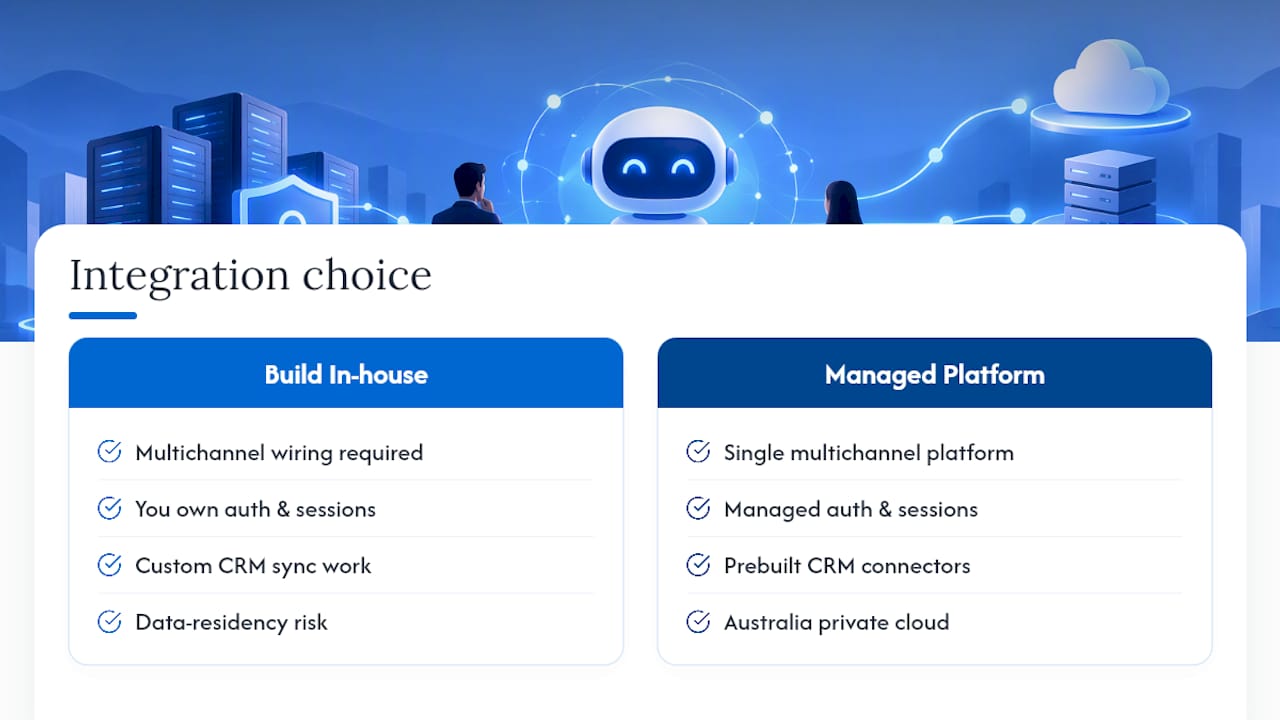
Conversational AI is the alternative to building and maintaining your own multichannel chat infrastructure from scratch. Instead of wiring separate APIs for voice, SMS, email and live chat, then bolting on CRM sync and hoping your data-residency story holds up under audit, you get one private cloud platform hosted entirely within Australia, built specifically for organisations that can’t afford a data sovereignty question mark.
The platform handles integration work including secure authentication, session continuity, CRM connections, and tool-calling into existing systems, as a managed layer rather than a project managed entirely in-house. That matters most in healthcare, finance and other regulated sectors, where the Conversational AI for Healthcare and Conversational AI for Banking and Finance deployments are built around the same data-boundary discipline covered above, not retrofitted onto it.
If you’re weighing whether to build this in-house or integrate an existing platform, start by exploring the Conversational AI CRM and request a walkthrough of how it connects to your current systems.
Sources
For deeper technical grounding, review OWASP’s Top 10 for LLM applications, the OWASP Authorization Cheat Sheet, and your provider’s own webhook and rate-limit documentation before shipping.
- OWASP DevGuide — web app checklist: protect data
- OWASP Authorization Cheat Sheet
- Slack API rate limits documentation
- OpenAI developer guide — webhooks
FAQ
Which API is best for chatbots?
There’s no single best chatbot API. The right choice depends on whether you need streaming for live UIs, OAuth2 for delegated user actions, or strong CRM integration. Platforms like Conversational AI are built for enterprises that need private hosting and multichannel support alongside the API layer itself.
Is there a free chatbot API?
Several providers offer free tiers for testing, usually capped by message volume or rate limits. Free tiers rarely include the session persistence, retention controls or CRM integration a production deployment needs, so treat them as prototyping tools rather than a launch plan.
What’s the difference between an API and a chatbot like ChatGPT?
An API is the programmatic interface, endpoints, authentication, request and response formats, that lets your software talk to a chat engine. A consumer chatbot is a finished product built on top of one; chatbot API integration is the work of wiring that same underlying capability into your own systems and workflows.
Can AI do API integration?
AI models can generate integration code, draft function schemas for tool calls, and even suggest error-handling logic, but they can’t replace validation, security review or testing. Treat AI-generated integration code the same way you’d treat a junior developer’s first pass: useful, but not production-ready without a proper review.